
Web Analytics Services
Turn raw website data into revenue-driving decisions with OuterBox’s Web Analytics Services. Our consultants implement, audit, and optimize analytics platforms to deliver accurate insights on traffic, engagement, and conversions—so you can confidently improve UX, scale marketing, and grow ROI.
"*" indicates required fields
"*" indicates required fields



Web Analytics Services Built for Accuracy and Action
Data is the backbone of a successful digital strategy. OuterBox tailors web analytics consulting to your unique goals, going beyond basic tracking to deliver clean, decision-ready insights. With 20+ years as a digital agency and 1,000+ successful client relationships, we set up GA4 and GTM correctly, audit data quality, integrate with SEO/PPC, and report on what matters—so you can optimize user experience, increase conversions, and maximize ROI.
What’s Included in Our Web Analytics Services
From implementation to ongoing optimization, we provide full-funnel analytics support aligned to your KPIs.

Web analytics services built on clean GA4 and GTM foundations
Your tracking layer needs to be accurate before anyone trusts the dashboard. Through Google Analytics consulting, GA4 and Google Tag Manager measure lead gen, ecommerce, content, paid media, SEO, and CRO. Web analytics services start with clean events, clear ownership, and a QA path your team can repeat.
- GA4 property settings use event names, parameters, conversions, audiences, and custom dimensions that match the way the business reports.
- The GTM container keeps tags organized by purpose, trigger, owner, and QA status, so future changes do not become guesswork.
- Key events can include generate_lead, purchase, begin_checkout, call clicks, form starts, video plays, and file downloads.
- The implementation plan accounts for cross-domain tracking, enhanced measurement, internal traffic filters, and consent-related settings.
That setup gives every channel a cleaner measurement foundation before campaign budgets, UX changes, and reporting decisions depend on it.
Website analytics services that make the numbers easier to trust
Bad data creates meetings where teams debate the report instead of fixing the funnel. Website analytics services should include bot traffic filtering, referral checks, duplicate-tag cleanup, and property-level review. Those checks need to happen before reporting becomes the source of record.
- Data-quality checks cover GA4 settings, GTM tags, conversion definitions, referral exclusions, subdomain behavior, consent states, and internal traffic rules.
- QA compares browser events, DebugView, form submissions, call clicks, and revenue events against what reports show later.
- Remediation lists separate tracking defects that distort revenue from cleanup items that can wait for the next release.
- Event naming rules stay visible, so new tags do not recreate the same reporting noise.
Cleaner data gives your team fewer arguments over what happened and more confidence in the decisions that follow.
Conversion tracking that follows the full lead path
Conversions rarely stop at one form fill. Online lead attribution connects form submissions, calls, site search, video plays, downloads, chat activity, and CRM outcomes. A web analytics consultant should map those moments before tags go live, so marketing sees quality behind the lead count.
- Event taxonomy distinguishes primary conversions, assisted actions, micro-conversions, and engagement signals that help explain buyer behavior.
- UTM rules keep source, medium, campaign, content, and term fields readable across paid, organic, email, social, and partner traffic.
- Attribution views show how channels assist one another instead of forcing every budget decision into last-click reporting.
- Lead reporting can carry source data into the CRM, then compare closed-won outcomes with the original web session.
Better attribution helps your team see which sources create qualified sales demand instead of raw activity alone.
Revenue analytics for carts, products, and checkout behavior
Revenue reporting breaks quickly when GA4 events do not match the store’s real catalog, promotions, and checkout flow. Strong web analytics consulting services tie eCommerce analytics metrics to product behavior, cart movement, and promotions. The same setup should connect channel performance with revenue beyond total sales.
- GA4 eCommerce setup can track view_item, add_to_cart, begin_checkout, purchase, refunds, coupon usage, and product impressions.
- Item parameters keep product IDs, categories, collections, prices, quantities, and promotion data consistent enough to report by segment.
- Checkout reporting shows where shoppers leave, which devices underperform, and which payment or shipping steps deserve closer review.
- Merchandising views connect product demand with SEO, paid media, email, and CRO activity around the same revenue outcomes.
Your merchandising and marketing teams make better decisions when product behavior and revenue reporting speak the same language.
Dashboards that turn site data into decisions
Dashboards should not become another place where numbers sit untouched. Reporting has to connect digital marketing KPIs with the questions leadership and channel managers already ask. A web analytics agency should make that view clear enough for decisions between monthly reads.
Looker Studio dashboards can separate executive metrics from operator detail. Leadership may need revenue, lead quality, conversion rate, pipeline contribution, and anomaly notes. Channel owners may need landing-page movement, campaign naming errors, form performance, audience quality, device splits, and the next issue to investigate.
The dashboard structure matters as much as the chart. Each view should have an owner, a decision it supports, and enough context to explain why a number changed.
Your stakeholders get a clearer path from performance movement to business decisions that deserve action.
Behavior insights that show where users hesitate
Behavior data is most useful when it helps the site team decide what to fix next. Analytics should support conversion rate optimization by showing where visitors hesitate, which paths break down, and which page elements deserve testing. That evidence keeps opinion from filling the gap.
- Funnel reports identify the step where users exit, abandon forms, restart checkout, or repeat the same navigation loop.
- Path exploration, scroll depth, internal search, and engagement events show the questions visitors answer before they convert.
- The CRO backlog can group issues by revenue risk, traffic volume, technical effort, and the confidence level behind each idea.
- Test reporting connects the winning variation to the audience, page type, device, and source that made the result meaningful.
Better behavior insight gives your CRO team a sharper list of friction points and a stronger reason for what moves first.
Channel reporting that connects SEO, PPC, email, and social
Channel reporting gets messy when every team names campaigns differently and judges success in isolation. Your SEO program, PPC, email, social, and referral channels need a shared measurement structure. A web analytics consultancy should make performance easier to compare across the same funnel, especially when several teams report into one leadership view.
- UTM standards define source, medium, campaign, content, and term rules before campaigns launch.
- Channel groups keep paid search, organic search, email, paid social, referral, affiliate, and direct traffic from blending into vague buckets.
- Cost imports and campaign IDs help paid teams compare spend against leads, revenue, and assisted conversions.
- Reporting flags tracking gaps when a launch, landing page, or platform update changes the data pattern.
Shared channel measurement gives budget conversations a common reporting language across traffic, cost, conversion, and revenue.
Analytics enablement for teams that own the reporting
Your team needs enough analytics fluency to answer everyday questions without waiting for a specialist to translate the report. Training should connect web analytics fundamentals with the property, dashboards, events, and business rules your people use after launch.
A web analytics consultant can walk stakeholders through GA4 explorations, GTM basics, conversion definitions, and dashboard ownership. The walkthrough should explain the difference between a tracking issue and a real performance shift. Event naming guides, KPI definitions, UTM rules, QA steps, and dashboard notes give new team members a place to start.
Enablement also protects the measurement system from well-intended changes. When teams know which tags they can edit, which events need QA, and which numbers drive decisions, analytics stays usable after handoff.
Your internal team gains enough context to use the numbers instead of depending on someone else to interpret every report.
Ongoing analytics support that protects tracking after launch
Tracking does not stay accurate by itself. Websites change, campaigns rotate, forms get replaced, privacy settings shift, and new scripts appear. Ongoing website analytics services can pair recurring QA with tools like LOOP Analytics so teams catch measurement problems before they distort reporting.
- The support cadence can include monthly QA, tag firing tests, conversion checks, dashboard review, release checks, and anomaly alerts.
- Change logs record what changed on the site, who approved it, and which reports should be watched afterward.
- Alerting rules help surface sudden drops in form events, revenue tracking, call clicks, paid traffic, or landing-page engagement.
- Optimization notes turn recurring reporting questions into fixes for tagging, dashboards, campaign naming, or conversion definitions.
Your measurement system stays dependable when analytics support keeps pace with the site, the campaigns, and the team using the data.
Advanced Analytics with Loop
Learn how our proprietary Loop Analytics platform transforms complex data into clear, actionable growth strategies. By integrating AI-powered lead scoring, automated call summaries, and a "chat with your data" feature, we help you identify your best prospects and optimize campaign performance in real-time. Our hands-on approach ensures your tracking and reporting work harder to drive measurable ROI across every channel.
Discover how Loop Analytics uses AI to score leads and provide instant data insights.
Web Analytics Services
Are You Ready to Rank #1
We’ll get back to you within 24 hours, Monday–Friday. Prefer to talk now? Call 1-866-647-9218 (9–5 EST).
Services
"*" indicates required fields
Your Web Analytics Partner
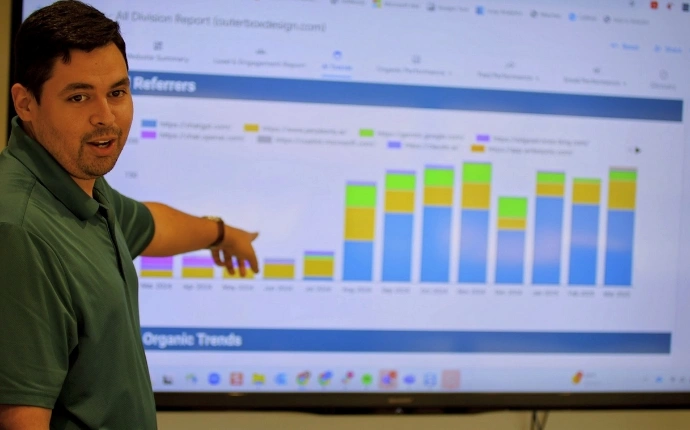
OuterBox is a results-driven web analytics company providing hands-on consulting and implementation. With 20+ years as a web design and digital marketing agency, 1,000+ successful client relationships, and 1,000+ custom features developed, we combine technical depth with marketing strategy. Work directly with a dedicated web analytics consultant who aligns measurement to your goals and provides actionable reporting.
20+ Years
Digital Marketing Agency
1000+
Successful Client Partnerships
2M+
Page #1 Google Rankings
250+
USA-Based, In-House Experts
Why Choose OuterBox for Web Analytics
We don’t just collect data—we make it usable, accurate, and tied to growth.

-
Experience: 20+ years, 1,000+ client relationships
-
Data Quality: Formal audits, governance, and ongoing QA
-
Implementation: GA4 + GTM with events, eCommerce schema, cross-domain, IP filters
-
Reporting: Executive-ready dashboards with actionable recommendations
-
Channel Integration: Aligned to SEO, PPC, social, and CRO for full-funnel clarity
-
Consulting Model: Dedicated analytics consultant and support team
-
Response Time: 24-hour response, Mon–Fri (9–5 EST)
-
eCommerce Readiness: Full GA4 eCommerce event coverage and checkout tracking
Typical Provider
-
Experience: 1–5 years, limited portfolio
-
Data Quality: Ad hoc fixes, limited QA
-
Implementation: Basic pageview tracking only
-
Reporting: Generic monthly reports without insights
-
Channel Integration: Siloed reporting by channel
-
Consulting Model: Rotating resources
-
Response Time: No defined SLA
-
eCommerce Readiness: Limited or incomplete setup

Did you know that even small inaccuracies—like duplicate tags, broken events, or messy UTMs—can skew attribution and waste ad spend, contributing to the 30% increase in costs that poor-quality data causes? A data quality audit often recovers hidden ROI fast. Get a GA4 & Tag Manager Audit>
Unlock Your Business’s Potential
Send us your website for a free quote and strategy session from OuterBox, tailored to drive success.
Need an expert now? Call 1-866-647-9218
"*" indicates required fields
"*" indicates required fields



Web Analytics Services FAQs

What types of data can your analytics services track?
We track website traffic, user behavior, conversions, bounce rate, time on site, returning visitors, form submissions, call tracking, internal site search, mobile analytics, PDF downloads, IP filtering, video views, and full GA4 eCommerce events (add-to-cart, checkout steps, purchases, refunds).
How do you ensure analytics data accuracy?
We properly configure GA4 and GTM, apply event governance and filters, remove spam/bot traffic, audit referral exclusions and cross-domain settings, QA tags, and provide ongoing monitoring to maintain data integrity.
How do web analytics insights integrate with SEO and PPC?
Clean UTMs, channel taxonomy, cost imports, and conversion tracking connect analytics to SEO, PPC, and social performance. We highlight what keywords, audiences, and creatives drive conversions and where to allocate budget.
Do you support GA4 migrations from Universal Analytics?
Yes. We map UA goals to GA4 events, rebuild conversions, configure eCommerce schemas, replicate audiences, and create dashboards that mirror or improve your legacy reporting.
Can you help with B2B lead tracking and CRM integrations?
Yes. We track form submissions, calls, and offline conversions, pass lead source/UTM data to your CRM, and report on pipeline quality and closed-won revenue by channel.
What is the typical implementation timeline?
Audits often take 1–3 weeks. A standard GA4 + GTM setup typically takes 2–4 weeks depending on site complexity, with ongoing optimization on a monthly cadence.
Which tools and platforms do you work with?
We primarily work with GA4, Google Tag Manager, and Looker Studio. We also accommodate call tracking tools, eCommerce platforms, and ad platforms to unify reporting.
What will you need from our team to get started?
Admin access to GA4 and GTM, staging and production sites for QA, ad platform access for cost and conversion imports, and a list of KPIs and key user journeys.
Related Articles: Web Analytics Services

Analytics | 5 min read
Thomas Jefferson once said, “Not all leads are created equal.” I think. Okay, he didn’t say that, but this sentiment holds true. Learning the elements…

Analytics | 5 min read
Whether you own a lead generation website or an eCommerce website , it is essential not only to track how many visitors your site gets,…
Analytics | 5 min read
Web analytics in digital marketing is more than just a tool for tracking website visitors — it helps businesses understand user behavior, conversion paths, and…