By: Craig Smith
Google Signals is a valuable tool for improving cross-device tracking and remarketing. This feature is found within Google Analytics 4 (GA4) and gives companies an idea of how much their audiences overlap and which campaigns need cross-device support the most. Over the past few years, Google Signals has become a common feature in many Analytics interfaces.
Let’s take a deep dive into Google Signals to learn how you can use it and apply its insights to your marketing campaigns.
What Are the Capabilities of Google Signals?
Google Signals extends your existing GA4 analytics capabilities. While GA4 already offers core analytics features, Signals adds deeper cross-device modeling, demographic insight, and audience stitching for users who opt into ad personalization. The top four benefits (per Google) are:
- Remarketing via GA4: You can build audiences and run cross-device remarketing campaigns leveraging Signals identifiers.
- Enhanced advertising reporting: With Signals, GA4 can incorporate additional user behavior signals (from opted-in users) for more robust ad attribution.
- Demographics & Interests reporting: Signals enables additional insight into users’ age, gender, and interests—data that GA4’s base setup doesn’t always provide.
- Cross-device modeling & reports: Google can stitch together a user’s interactions across devices (user-based rather than session-based), when thresholds and eligibility permit.
At its core, Google Signals only works for users who have Ad Personalization turned on. Users who decline personalized ads get excluded from these enriched features. As a result, Signals-based remarketing and demographic reporting apply only to a subset of your audience.
In 2024, Google removed Signals from GA4’s reporting identity. While Signals data still applies to audiences, demographics, and cross-device features, its contribution to standard user stitching in reports has shifted.
How to Activate Google Signals
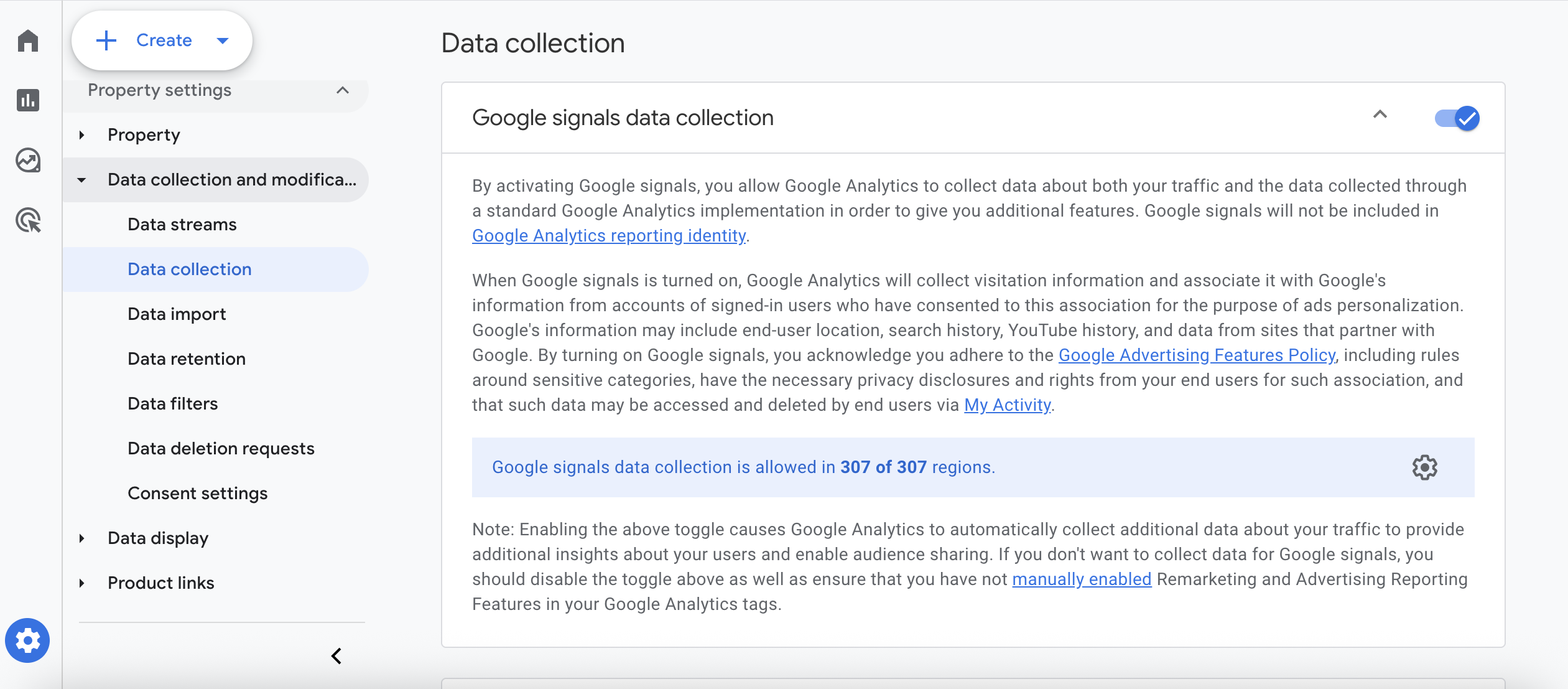
You can turn on Google Signals directly within the GA4 interface, and the setup takes less than a minute.
- Sign in to Google Analytics 4.
- Click the Admin gear icon in the bottom-left corner.
- Under your property, select Data Settings > Data Collection.
- In the Google Signals data collection section, click Get Started (or Manage Google Signals data collection if you’ve accessed it before).
- Click Continue, then Activate to enable the feature.
You can manually disable Google Signals at any time. GA4 provides a simple toggle that lets you pause or resume Signals data collection without affecting your core analytics tracking.
What Insights Can You Take Away From Google Signals
Once you’re familiar with the features and reports of Google Signals, you can apply these insights to your data analysis. Below are a few use cases that you can follow to improve your overall digital marketing efforts.
See Where Your Device Use Overlaps
What percentage of users engage with your content across multiple devices? While GA4 no longer includes a dedicated Device Overlap report as Universal Analytics once did, Google Signals still models cross-device behavior behind the scenes.
You can use Exploration reports or Attribution → Conversion paths to see how users move between devices and how those interactions contribute to conversions.
For example, a brand like LinkedIn might have a high overlap rate because users like to search for jobs on their mobile devices and then apply for them on their desktops. This is because they can access their resumes on their computer and can edit and attach their cover letters more easily. With this information, LinkedIn can develop a plan to make saving jobs across devices easier or work on a campaign to encourage more people to apply for jobs on their smartphones.
See Which Campaigns Have the Most Overlap
One of the biggest issues marketers have is tracking assisted conversions, or conversions that moved consumers to buy but weren’t necessarily the first or last touch. With Google Signals enabled, GA4 can connect these journeys across signed-in devices. Using Conversion paths and Model comparison reports, you can see which campaigns play a crucial role in moving users along the funnel, preventing you from cutting a channel that quietly drives awareness and assisted sales.
Recapture Customers With Cross-Device Remarketing
Move customers deeper into the sales funnel with remarketing across different devices. Cross-device remarketing through Google Ads depends on ad personalization consent and linked GA4 + Google Ads accounts. When enabled, Google Signals provides the cross-device identifiers that power these audiences.
For example, your user clicks on a paid ad to your website while on the bus. They scroll through your pages and consider your brand. Then, they become distracted when the bus reaches their stop. Your remarketing ad brings them back to your website when they see it later on their desktop. Your user is now more focused and ready to purchase, turning a top or mid-funnel customer into a bottom-funnel converter.
Learn How Specific Personas Behave
Because the data collected from Google Signals is user-based rather than session-based, you can better understand how your audiences behave. This, paired with better demographics and interests reporting, allows you to line up different behavioral patterns with different profiles.
Demographics and interests data in GA4 (powered by Signals) are available only when reporting thresholds are met, ensuring user privacy. Still, this insight helps marketers align behavioral patterns with audience types for more precise targeting. Brands can better create campaigns for specific target audiences based on their behavior and change the campaigns based on audience response.
For example, a brand might create a cross-device remarketing campaign for less tech-friendly audiences who prefer using their desktops for purchases.
Discover Other Analytics Tools and Capabilities
While the Google Signals feature is a valuable tool for better exploring your audiences and their behavior, it’s only one part of your data ecosystem. The vast majority of marketers have a disjointed data process—different platforms, disconnected dashboards, and isolated datasets that make it hard to see the full picture.
At OuterBox, we want to take that a step further. We work to grow your data maturity so that all systems are connected together and centralized in one platform. You’ll benefit from looking at one centralized information source on which you can base your decisions.
When your analytics ecosystem is connected, you don’t just collect information—you act on it. Let’s discuss how OuterBox can help you transform data into growth.