By: Jeff Hirz
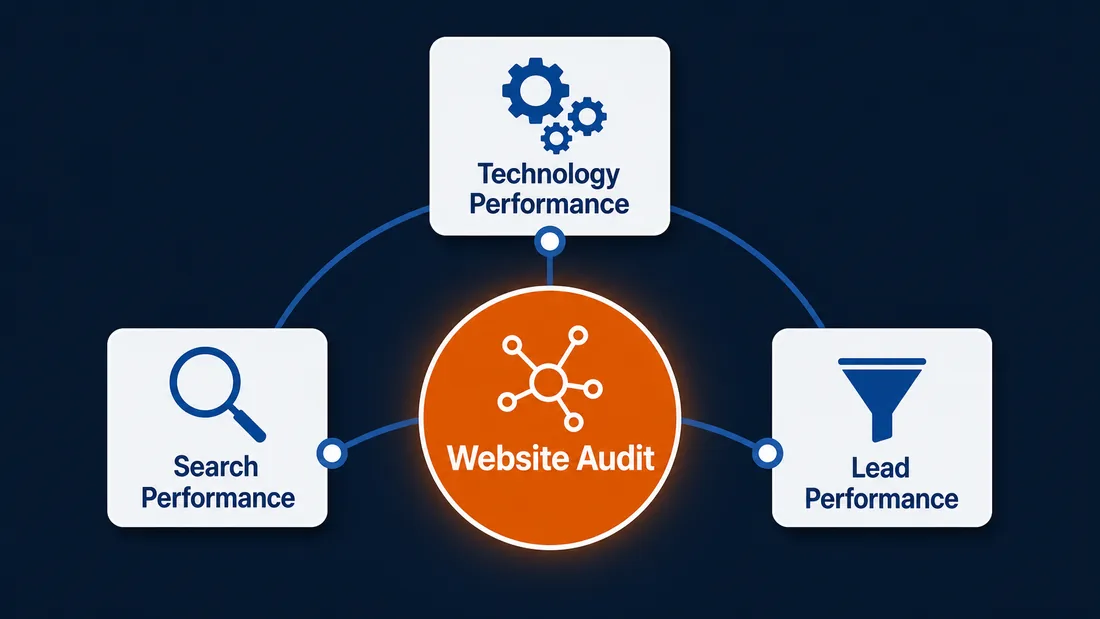
Learning how to audit a website starts with one question: where is the site quietly holding the business back? A good audit does not stop at a speed score, a broken-link report, or a list of keyword misses. It connects the website’s technology, search visibility, and lead performance to the decisions your team needs to make next.
That is the useful part of the original article’s three-question frame. Your site can look fine and still be hard for Google to crawl, slow on mobile, thin on important service pages, confusing for buyers, or disconnected from the reporting your sales team actually uses.
Use this website audit checklist as a first pass. It will not replace a full technical review, but it will help you see which problems are small fixes, which require deeper SEO or analytics work, and which point toward a larger website redesign.
What Is A Website Audit And Why Is It Important?
A website audit is a structured review of how your site performs for users, search engines, and the business behind it. It looks at the front end, which is what visitors see, and the back end, which is how the site loads, tracks, renders, ranks, and routes leads.
The IRS is not involved. The point is the same as any business audit: find the gaps before they cost more. A website audit can reveal why a page is not ranking, why a form is not converting, why mobile users leave, why leads are not attributed correctly, or why a site that once felt modern now feels hard to maintain.
The best audit output is not a giant list of problems. It is a ranked decision plan: fix, update, consolidate, redesign, or monitor.
That is why a website audit is important: it turns scattered technical, search, and lead-performance issues into a sequence your team can actually act on.
How To Audit A Website In 7 Steps
Start with the pages that matter most. For most companies, that means the home page, top service pages, high-traffic articles, top conversion paths, and any pages tied to paid media, email, or sales follow-up.
If you are deciding how to conduct a website audit for the first time, keep the sequence in this order.
Use this sequence:
- Confirm the page loads, renders, and returns the right status code.
- Test the page on mobile and desktop like a real visitor.
- Check crawlability, indexation, canonical tags, and sitemap signals.
- Review the content for accuracy, search intent, proof, and calls to action.
- Inspect metadata, headings, image alt text, internal links, and structured data.
- Test forms, phone calls, lead routing, analytics events, and CRM handoff.
- Compare the page against competitors and prioritize the fixes by business impact.
The first two steps answer the technology-performance question. Steps three through five answer the search-performance question. Steps six and seven answer the lead-performance question and turn the audit into a fix order.
That sequence keeps the audit practical. A better meta description will not matter much if the page is blocked from indexing. A faster page will not fix a form that sends leads to the wrong inbox. An SEO audit should sort those dependencies before the team starts changing copy.
Question 1: How Is Your Website’s Technology Performance?
Technology performance is the first audit question because every other part of the site depends on it. Search engines need to access the page. Users need the page to load and work. Your team needs the CMS, forms, scripts, and integrations to behave predictably.
Start with the basics. Does the page return a successful HTTP status code? Does it render the main content without a long delay? Does the mobile version show the same important information as desktop? Are there broken images, missing fonts, layout shifts, disabled buttons, or scripts that fail before the visitor can act?
Google’s minimum technical requirements are a useful floor: Googlebot must not be blocked, the page must work, and the page must contain indexable content. Passing that floor does not guarantee indexing or rankings, but failing it can stop everything else from mattering.
For speed, use PageSpeed Insights or a similar performance tool to check Core Web Vitals. The current Core Web Vitals are Largest Contentful Paint (LCP), Interaction to Next Paint (INP), and Cumulative Layout Shift (CLS). Good targets are LCP within 2.5 seconds, INP at 200 milliseconds or less, and CLS at 0.1 or less, measured around the 75th percentile of users.
Do not treat those numbers as the whole audit. A site can pass a lab test and still frustrate users if the navigation is confusing, the form is buried, or a popup blocks the main answer. Technology performance also includes:
- Mobile layouts, tap targets, sticky headers, and content that may disappear on small screens.
- Accessibility checks against current WCAG 2.2 guidance, including focus states, labels, contrast, and target size.
- Security basics such as HTTPS, mixed content, exposed staging pages, and outdated plugins or themes.
- Broken links, redirect chains, missing images, and 404 pages.
- CMS bloat, old scripts, unused apps, heavy third-party tags, and duplicate tracking pixels.
- JavaScript-rendered content that may be hard for crawlers or users to reach.
Manual testing still matters. Move through the site like a customer. Search for a product or service. Open the menu. Use filters. Click calls to action. Submit a test form. Try the same path on a phone. If the experience feels fragile to you, it probably feels worse to a buyer who has no context.
This is where technical SEO and web development overlap. The audit should not just say “site is slow.” It should identify whether the fix is image compression, server response time, render-blocking code, app cleanup, template changes, tracking governance, or a platform decision.
Question 2: How Is Your Website’s Search Performance?
Search performance is more than where one keyword ranks. A website audit should ask whether the site can be crawled, indexed, understood, cited, and trusted across the queries that matter to the business.

Start in Google Search Console. The URL Inspection tool can show what Google knows about a specific page, including crawl access, page fetch, indexing allowed, and Google-selected canonical data. That is useful when a page is missing from Google, showing the wrong canonical, or not behaving the way the CMS preview suggests.
Then review the page itself. Does the title tag describe the page? Does the H1 match the main topic? Do H2s cover the actual subtopics a reader expects? Are meta descriptions written for people, or are they blank, duplicated, or stuffed with keywords? Do image alt attributes describe meaningful images without turning decorative assets into keyword storage?
Content is the next layer. The current article was right to call this out. Audit content for accuracy, freshness, search intent, and usefulness. Ask:
- Does the page answer the main query quickly?
- Does it include expert detail, examples, proof, or source support?
- Are claims, prices, screenshots, dates, policies, and platform details still current?
- Does the page overlap another page on the site and create cannibalization?
- Are weak sections ranking because they are useful, or because no one has touched the page in years?
- Is the CTA clear without crowding the educational value?
Search results also changed. A page can rank and still lose clicks if AI Overviews, featured snippets, ads, local packs, or zero-click results answer part of the query before a user clicks. That does not mean the page failed. It means the audit should compare rankings, impressions, clicks, query mix, and SERP features together.
Technical SEO belongs in this search-performance pass too. Check robots.txt, XML sitemaps, noindex tags, canonical tags, pagination, redirects, hreflang where relevant, and internal links. Robots.txt controls crawling, not guaranteed removal from search. A noindex directive controls indexing only after a crawler can access the page. Canonicals help consolidate duplicate or similar pages. Mixing those up creates cleanup work.
Structured data is another audit point, especially for articles, services, products, FAQs, breadcrumbs, reviews, and local business details. Google’s structured data guidelines are clear that markup should represent visible page content. If the JSON-LD says one thing and the body says another, the markup is not helping the page become more trustworthy.
A strong search audit ends with priorities. Fix pages that cannot be crawled or indexed before rewriting a paragraph. Fix canonical and redirect problems before adding more internal links. Update thin high-value pages before polishing low-value posts. SEO works better when the foundation and the content improve together.
Question 3: How Is Your Website’s Lead Performance?
Lead performance is where a website audit becomes a business audit. A site can load quickly, rank well, and still fail if visitors do not know what to do next or if qualified leads never reach the right person.
When you audit your website for lead performance, test the actual conversion path instead of reviewing the page only in the CMS.
Start with forms. Submit every important form on desktop and mobile. Confirm the form validates fields properly, shows a useful confirmation, sends email notifications to the right people, records the lead in the right system, and triggers the right next step. If the form feeds a CRM, check field mapping, source data, campaign parameters, spam filtering, and duplicate handling.
Call tracking deserves the same attention. If phone calls matter, verify the number displays correctly, call tracking swaps only where intended, and calls are attributed to the right channel. A tracking number that breaks on one template or appears in cached HTML can distort reporting and lead routing.
Analytics should connect the visit to the outcome. Review GA4 events, conversions, landing pages, traffic channels, Search Console queries, CRM records, and offline sales notes together. Tools like OuterBox’s LOOP Analytics and call tracking help when standard web analytics cannot explain which leads became real opportunities.
Then inspect the page experience through a conversion lens:
- Do service pages explain who the offer is for?
- Are CTAs specific enough to guide the next step?
- Are forms asking for too much too early?
- Does the page answer common objections before the form?
- Are trust signals, case studies, reviews, or credentials visible where a buyer needs them?
- Is the mobile CTA easy to find without blocking content?
- Are thank-you pages and follow-up messages useful?
This is where conversion optimization can turn a hunch into evidence. If the audit finds unclear CTAs, weak form performance, confusing navigation, or drop-offs between landing page and lead submission, the next step may be testing rather than a full redesign.
Competition belongs in this question too. Your website does not exist alone. Buyers usually compare several options, especially in B2B. Review competitor pages for offer clarity, proof, page speed, navigation, service depth, pricing context, and conversion paths. Do not copy their site. Use the comparison to see where your page is vague, slow, thin, or missing the proof buyers expect.
Lead performance should produce a clear answer: are we losing people because they cannot find the page, cannot trust the page, cannot use the page, or cannot complete the next step?
How To Prioritize Website Audit Fixes
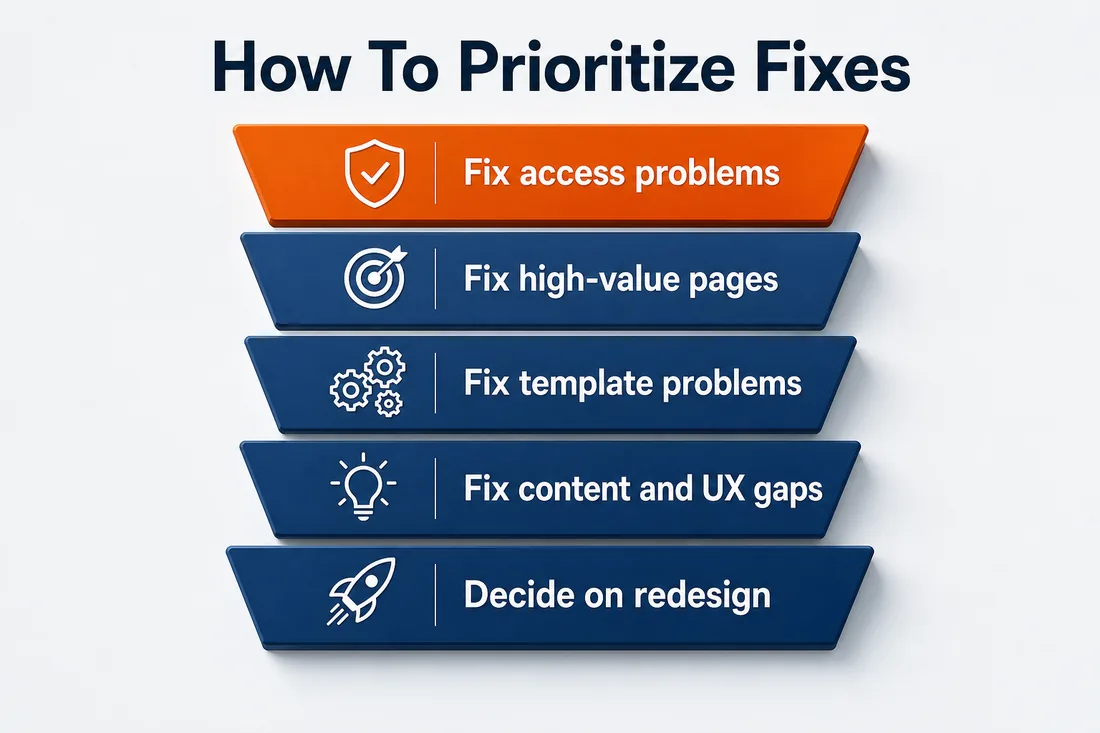
The hardest part of a website audit is not finding problems. It is deciding what to fix first.
Use this order:
- Fix access problems: server errors, blocked crawlers, noindex mistakes, broken templates, and critical form failures.
- Fix high-value page problems: revenue pages, top articles, landing pages, and pages with ranking or lead opportunity.
- Fix repeated template problems: metadata rules, schema, navigation, tracking, mobile layout, image handling, and slow global scripts.
- Fix content and UX gaps: thin copy, unclear CTAs, weak proof, confusing layouts, stale examples, and missing internal links.
- Decide whether the site needs a redesign, not just edits.
Some audit findings are small changes. Some are upgrades. Some expose deeper platform or template debt. And sometimes the honest answer is that the site needs a new structure, a new design system, or a different CMS workflow. If the same issue appears across many pages, a website redesign may be cheaper than patching the same problem forever.
The audit should leave your team with owners, priorities, and sequencing. Fix the items that affect revenue, visibility, and trust first. Park cosmetic issues until the core path works.
Website Audit FAQs
How often should you audit your website?
Audit important pages at least once or twice a year, and run focused checks after redesigns, migrations, platform changes, major Google updates, tracking changes, or traffic drops. High-value pages deserve more frequent monitoring than low-traffic posts.
What should a website audit include?
A website audit should include technical performance, crawl and index status, content quality, metadata, links, mobile usability, accessibility, forms, analytics, attribution, and competitor comparison. The goal is a ranked fix list, not a longer spreadsheet.
Can I audit my website myself?
You can run a first-pass website audit yourself with Search Console, PageSpeed Insights, analytics reports, manual mobile testing, form submissions, and competitor review. Bring in specialists when issues involve crawl behavior, schema, tracking, CMS templates, or conversion testing.
What tools do I need for a website audit?
Useful tools include Google Search Console, PageSpeed Insights, GA4, your CRM, call tracking, a crawler, browser dev tools, and accessibility checks. Tools find symptoms. Human review decides which symptoms matter to rankings, users, and revenue.
When does a website audit mean I need a redesign?
A redesign is worth considering when audit issues are structural: outdated templates, slow global code, weak mobile UX, hard-to-maintain CMS patterns, poor conversion paths, or content architecture that no longer matches the business. Single-page issues usually need fixes, not a rebuild.

Turn A Website Audit Into A Better Website Roadmap
A useful website audit gives your team a calmer way to decide what comes next. It separates urgent problems from noise, shows which pages deserve attention first, and connects technical work to search visibility and lead quality.
If your audit points to crawl issues, weak content, poor conversion paths, or a site that no longer supports the business, OuterBox can help turn the findings into a practical roadmap. Start with the problems that affect performance now, then build the foundation that will hold up after the next update.