By: Adam Littell
JavaScript SEO problems usually do not look like JavaScript problems at first.
The page loads for your team. The category has products. The title tag looks right in the browser. The developer says the template is working. Then rankings slip, pages drop from the index, or Google starts treating important URLs like thin content. Everyone keeps checking the visible page and missing the version Google actually processed.
That is the real JavaScript SEO issue: not JavaScript itself, but the gap between what users see and what crawlers can discover, render, trust, and index.
Google can process JavaScript. Google Search Central says JavaScript pages are processed through crawling, rendering, and indexing, and Google runs JavaScript with an evergreen version of Chromium. But that does not make JavaScript risk-free. It means technical SEO teams need to verify the rendered result rather than assume it.
We have seen this happen with a B2C ecommerce client. Category pages were their main organic landing pages, and they started disappearing from search one at a time. Nothing looked wrong to a person loading the page. The product grid showed up immediately. But on first render the page flashed “No Items in Category” before the products loaded, and the flash was fast enough that no human eye would catch it. Google’s rendering pipeline did. Something had shifted in the timing. Maybe on the server side, maybe in how Google was rendering the page. Whatever it was, the empty-state frame landed at the moment Google captured the rendered HTML, and that was the version it indexed. We confirmed it by pulling the saved version in Google Search Console’s URL Inspection tool, where the rendered HTML still showed the empty-state message instead of the product grid. The fix was on the development side: change the rendering sequence so the empty-state copy only appears when the category actually has no products, instead of as a default while data loads. Once that shipped, the affected category pages came back into the index.
That is why JavaScript SEO audits have to look past the browser view. You need to inspect raw HTML, rendered HTML, Googlebot’s tested view, crawlable links, status states, metadata, structured data, and the timing of content that appears after JavaScript runs.
What Is JavaScript SEO?
JavaScript SEO is the technical SEO work of making JavaScript-powered pages crawlable, renderable, indexable, and reliable for search engines. It focuses on whether crawlers can discover URLs, load critical resources, render the right content, read metadata and schema, follow links, understand status states, and index the correct version of each page.
It is part of technical SEO services, but it sits close to development, platform architecture, and ecommerce operations. A JavaScript SEO issue can live in a React component, a product API response, a canonical tag, a client-side route, a lazy-loaded content block, a category template, or the way a headless frontend handles empty states.
The work is not to remove JavaScript. The work is to prove that JavaScript is not hiding or changing the signals search engines need.
That proof matters most on pages that drive organic revenue: category pages, product pages, comparison pages, location pages, editorial hubs, store locators, and any template used across hundreds or thousands of URLs.
How Google Processes JavaScript Pages
Google describes JavaScript processing in three main phases: crawling, rendering, and indexing. That sequence is the foundation for every JavaScript SEO audit.
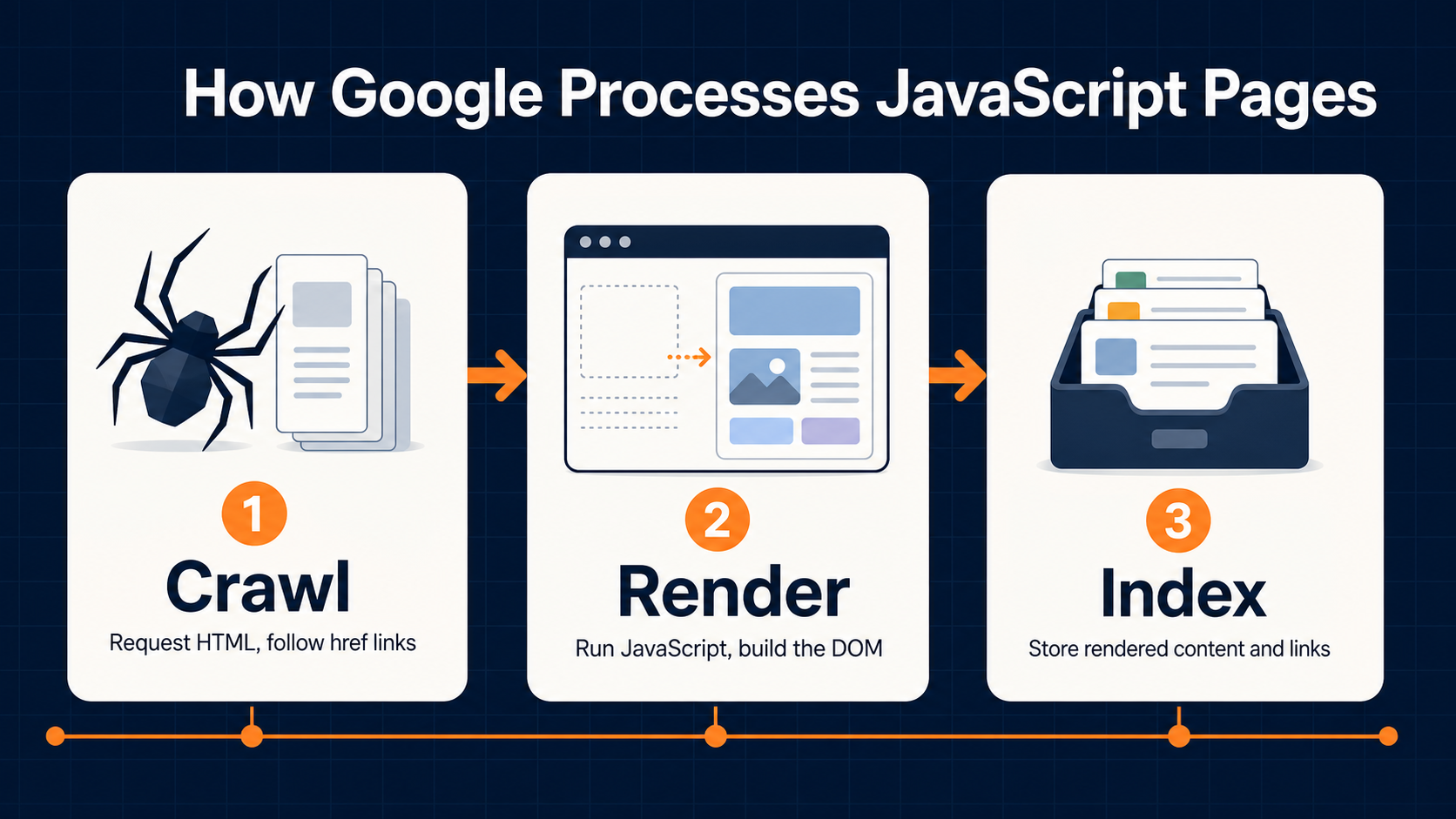
First, Googlebot crawls the URL. It checks whether crawling is allowed, requests the page, parses the initial HTML response, and extracts links from crawlable href attributes. At this stage, Google can discover links that are already present in the HTML response. Links inserted later by JavaScript may still be found, but only after rendering.
Second, Google queues eligible pages for rendering. Google Search Central says Googlebot queues pages with a 200 HTTP status code for rendering unless a robots meta tag or header tells Google not to index the page. Rendering happens in a headless Chromium environment, where Google executes JavaScript and produces rendered HTML.
Third, Google uses the rendered HTML for indexing and parses it again for links. That means the rendered DOM can influence what Google indexes, what links it discovers, and what content it associates with the URL.
The important word is “eligible.” A page can block itself before rendering. If a raw HTML page includes noindex, Google may skip rendering and JavaScript execution, so using JavaScript to remove or change that directive later may not work. A page can also return a status state that sends the wrong signal, block required JavaScript resources, or depend on browser state that Googlebot does not retain.
Google’s JavaScript troubleshooting documentation also notes that Web Rendering Service does not retain local storage, session storage, or cookies across page loads. If your page needs persisted browser state to show important content, pricing, inventory, or navigation, that content may not appear the same way for Google.
This is why “it works in Chrome” is not enough. Googlebot is browser-like, but it is not your normal customer session.
Where JavaScript Creates SEO Risk
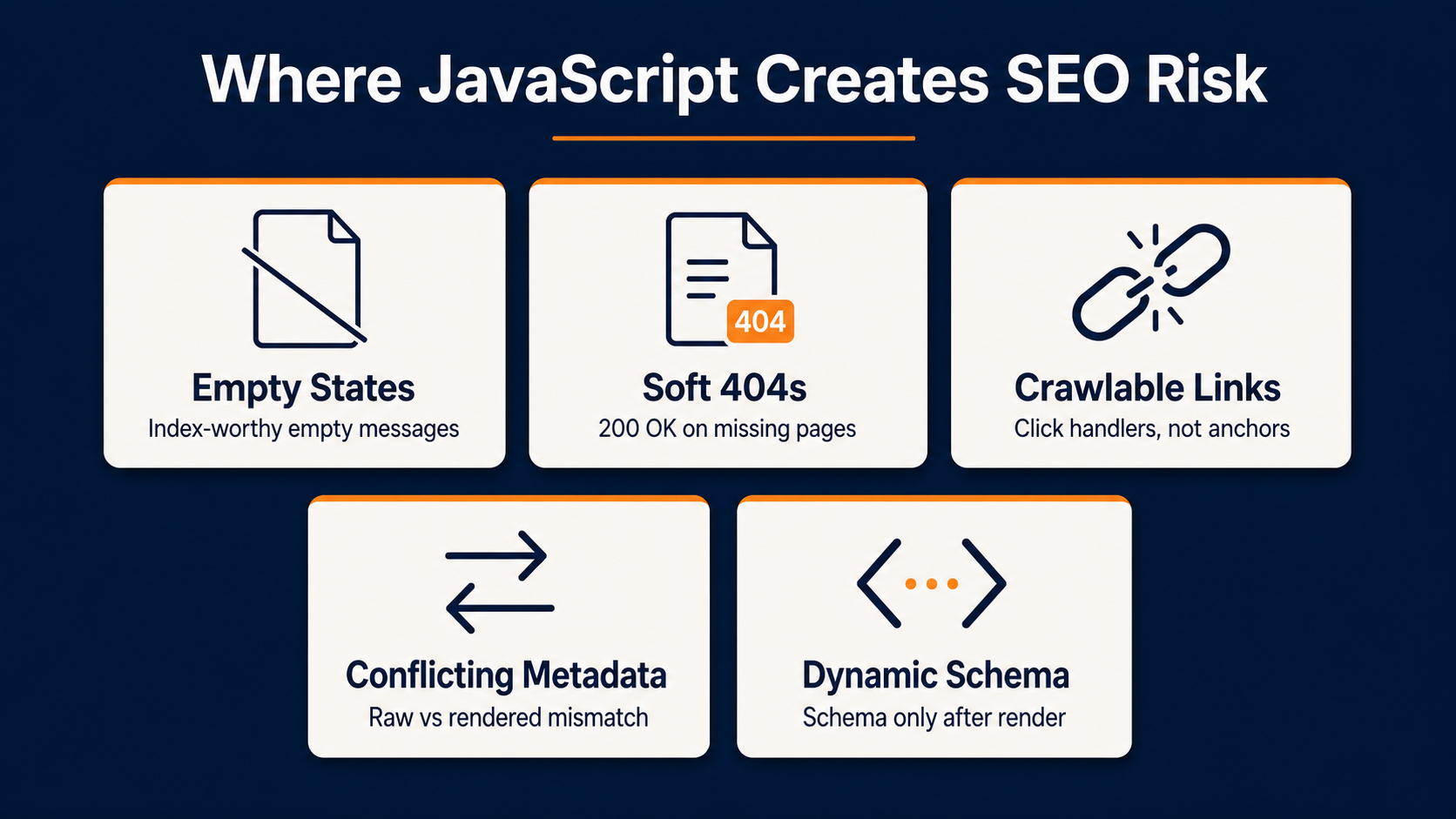
JavaScript creates SEO risk when search-critical information appears too late, appears only after an interaction, appears in an unstable state, or conflicts between raw and rendered HTML.
The category-page example shows the pattern. The template technically loaded products, but the first rendered state told Google there were no products in the category. Users did not notice because the empty message disappeared quickly. Google did.
That kind of issue can happen in several places.
Render Timing And Empty States
Many JavaScript templates show temporary content while data loads. That can be harmless when the placeholder is a skeleton loader or a neutral loading state. It becomes risky when the temporary state says something indexable, such as “No products found,” “No results,” “This page does not exist,” or a thin generic message.
For ecommerce sites, this is especially dangerous on category pages and product listing pages. If Google indexes the empty state instead of the loaded product grid, the page can look thin, irrelevant, or unavailable.
Client-Side Routing And Soft 404s
Single-page applications often use client-side routing. If a product, category, or content page does not exist, the server may still return 200 OK while JavaScript displays an error message. Google warns that SPA error handling can report a 200 status code instead of the appropriate status code, which can lead to error pages being indexed.
For SEO-critical pages, meaningful status codes still matter. A removed product, empty category, discontinued SKU, or invalid filtered URL should not accidentally look like a valid indexable page.
Links That Work For Users But Not Crawlers
Google’s link best practices are direct: Google can generally crawl a link if it is an <a> element with an href attribute. JavaScript-injected links can be crawlable as long as they use that markup.
That means event-only navigation is risky. Buttons, spans, onclick handlers, javascript: URLs, empty anchors, and links that only exist after a user clicks can limit discovery. A user can still move through the site, but Google may not find the same paths.
Internal links matter for product grids, related products, category pagination, faceted navigation, blog modules, and cross-links into service pages. If those links are built for user interaction but not crawler discovery, the site can quietly starve important URLs of internal link equity.
Conflicting Metadata And Directives
JavaScript can update title tags, meta descriptions, canonicals, and robots directives. Sometimes that is intentional. Sometimes the raw HTML and rendered HTML disagree.
Canonicals are a common failure point. Google’s JavaScript SEO documentation says JavaScript can set a canonical URL, but it should not change it to something different than the canonical in the original HTML. Multiple or conflicting canonicals can create unexpected outcomes.
Robots directives are even riskier. If Google sees noindex in raw HTML, it may not render the page. If your JavaScript later changes that page to index, Google may never reach the later instruction.
JavaScript-Generated Structured Data
Google can understand structured data that is available in the DOM when it renders the page. That is useful for JavaScript-heavy sites, but product markup deserves extra care.
Google’s structured data documentation warns that dynamically generated Product markup can make Shopping crawls less frequent and less reliable for fast-changing content such as price and availability. For ecommerce teams, that means product schema should be tested across live states: in stock, out of stock, sale pricing, variants, reviews, and discontinued products.
Rendering Choices: CSR, SSR, Static Rendering, And Hydration
Rendering strategy is not just a development preference. It affects crawlability, speed, reliability, and how much work Google has to do before it can understand a page.
Client-side rendering means the browser receives a thin HTML shell and JavaScript builds the page in the browser. This can work, but it makes SEO depend on successful JavaScript execution, API responses, route handling, and rendered DOM output.
Server-side rendering sends meaningful HTML from the server in response to a request. web.dev defines server-side rendering as rendering an app on the server to send HTML rather than JavaScript to the client. For SEO-critical templates, that often reduces risk because content, links, and metadata are available earlier.
Static rendering generates HTML ahead of time. It can be a strong fit for pages that do not need to change on every request, such as editorial content, many landing pages, and stable category content. It can also reduce JavaScript cost when paired with careful client-side enhancement.
Hydration starts with server-rendered HTML, then uses JavaScript to add interactivity. It can be effective, but hydration still needs testing. A page can show content early and then replace, duplicate, hide, or break parts of the DOM during hydration.
Dynamic rendering is different. Google now describes dynamic rendering as a workaround rather than a long-term solution. The guidance recommends server-side rendering, static rendering, or hydration instead. Dynamic rendering can still be a temporary fallback for some sites, but it adds complexity and should not be the first recommendation for a new build.
For React SEO and SPA SEO, the right question is not “Is React good for SEO?” The right question is “Which templates need stable, crawlable HTML before or during rendering, and how are we proving that Google receives it?”
That question applies to Shopify Hydrogen and headless builds, Magento or Adobe Commerce PWA implementations, BigCommerce headless frontends, and custom React applications. None of those platforms is automatically bad for SEO. But each architecture needs testing at the template and state level.
JavaScript SEO Best Practices
The safest JavaScript SEO work is practical. It gives developers a specific problem to fix and gives SEO teams a way to verify the outcome.
Put Critical Content In A Stable Rendered State
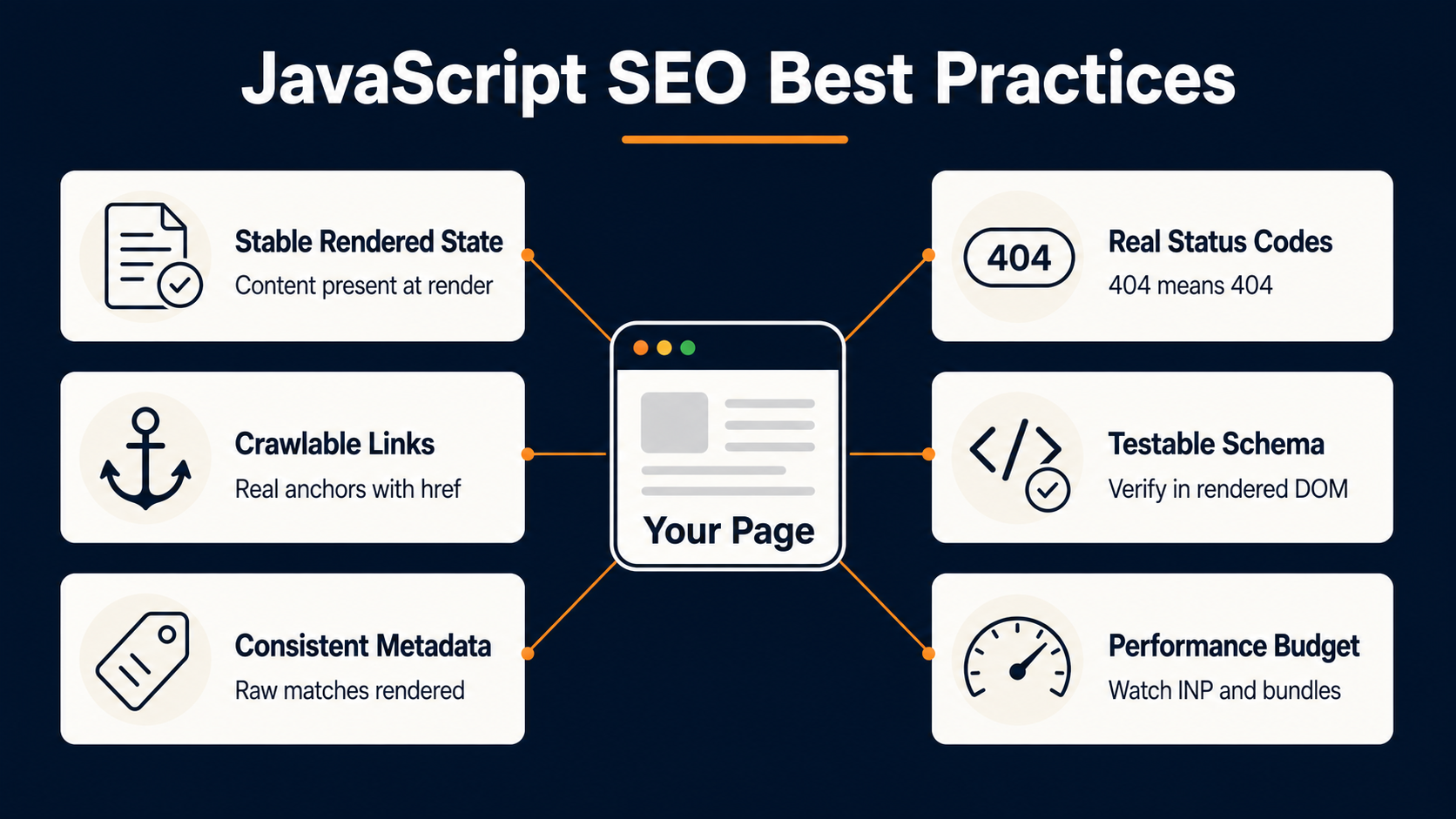
Core content should not depend on a fragile race between JavaScript, APIs, third-party scripts, and crawler timing. Category copy, product names, prices, inventory states, reviews, headings, internal links, and indexable body content should be present in the rendered HTML Google can inspect.
If a template needs a loading state, keep it neutral. Avoid rendering indexable empty-state messages before data loads. A skeleton loader is safer than “No Items in Category” if the final state is still pending.
Use Crawlable Links
Build internal navigation with normal anchors. Product cards, category links, pagination, breadcrumbs, related articles, and service links should use <a href="/path/">anchor text</a> or equivalent framework output that renders to a real anchor.
JavaScript can enhance the behavior. It should not be the only way the link exists.
Keep Metadata Consistent
Compare raw and rendered title tags, meta descriptions, canonicals, robots directives, hreflang, and structured data. The rendered version matters, but raw HTML can still create problems, especially when a restrictive directive appears before rendering.
If a JavaScript framework manages metadata, test several template states. Do not inspect only one homepage or one product page and assume the whole system works.
Use Real Status Handling
Do not let client-side routing turn every state into a 200 OK page. Invalid URLs, removed products, empty categories that should not be indexed, and protected pages need a deliberate status or indexation strategy.
Sometimes that means server-side 404s. Sometimes it means a noindex strategy. Sometimes it means redirecting retired URLs to a better match as part of an SEO migration or cleanup plan. The key is that the status should match the business and indexation reality.
Test JavaScript-Generated Schema
Structured data should match visible content. On ecommerce pages, test schema when pricing, availability, variants, and reviews change. If product schema is generated only after JavaScript runs, confirm it appears in the rendered DOM and in Google’s testing tools.
Watch Performance As Part Of Indexation
Performance is not separate from JavaScript SEO. Heavy JavaScript can delay content rendering, increase interaction delays, and make the rendered state less reliable. web.dev notes that the amount of JavaScript required by client-side rendering tends to grow as an application grows, which can affect INP.
You do not need to turn every JavaScript SEO audit into a full performance audit. But if the main content depends on a heavy bundle, slow API, or hydration step, performance can become indexation risk.
JavaScript SEO For Ecommerce And Headless Sites
Ecommerce sites feel JavaScript SEO problems faster because the same template powers many URLs.
One bad product listing page component can affect hundreds of categories. One broken internal link module can isolate a product group. One unreliable product schema pattern can create inconsistent rich-result eligibility. One client-side route bug can turn discontinued products into indexable soft 404s.
Start with the templates that matter most:
- Category and product listing pages
- Product detail pages
- Faceted navigation and filtered URLs
- Search results pages
- Store locators
- Pagination and load-more modules
- Related product and recently viewed modules
- Review, pricing, inventory, and variant components

For Shopify Hydrogen or other headless Shopify builds, verify category grids, product data, canonical handling, internal links, and server-rendered output. For Magento or Adobe Commerce PWA builds, test category pages, layered navigation, product variants, and indexable state handling. For BigCommerce headless builds, check routing, product data, schema, and links across collection and product templates.
Again, the platform is not the problem. The rendered outcome is what matters.
This is also where a JavaScript SEO audit connects to eCommerce SEO, Shopify SEO, Magento SEO, and BigCommerce SEO. Organic revenue depends on templates that search engines can read consistently instead of only pages that look right in a user session.
JavaScript SEO Audit Checklist
A good JavaScript SEO audit should reproduce what Google sees rather than only what the team sees in a browser.
- Inspect raw HTML. Check view source or a direct HTML fetch. Look for title, canonical, robots directives, main heading, body content, internal links, structured data, and obvious app-shell-only output.
- Inspect rendered HTML. Use browser DevTools, a crawler with JavaScript rendering, and practical tools like the
View Rendered JavaScriptplugin to compare the final DOM to the raw source. The plugin can be helpful when view source only shows raw HTML and you need to see what the eventual rendered HTML looks like. - Use Google Search Console URL Inspection. This is the critical check. Test the live URL when needed, but also review Google’s saved or crawled version when the issue is already in the index. Look for missing content, blocked resources, console errors, screenshots, and rendered HTML differences.
- Compare templates instead of isolated URLs. Test a category with products, an empty category, a high-value product, an out-of-stock product, a filtered URL, a pagination page, and a page that recently changed. JavaScript issues often appear in states rather than the default happy path.
- Check crawlable links. Extract links from raw HTML and rendered HTML. Confirm product cards, pagination, breadcrumbs, category modules, and service links render as real anchors with
hrefattributes. - Check metadata conflicts. Compare title, meta description, canonical, robots, hreflang, and schema before and after rendering. Watch for duplicate canonicals, changed canonicals, or raw
noindexdirectives that JavaScript tries to override. - Validate status states. Test removed products, invalid categories, empty filtered pages, and app routes. Confirm the HTTP status, rendered message, robots directive, and canonical all agree.
- Test structured data in rendered DOM. Use Google’s Rich Results Test and inspect rendered HTML. For ecommerce pages, test price, availability, reviews, variants, and SKU states.
- Review performance where content depends on JavaScript. If main content appears late, check bundle size, API timing, hydration, lazy loading, and render-blocking resources. The question is not only whether content eventually appears. It is whether Google reliably sees the intended state.
- Document ownership. Every issue should map to a fix owner: SEO, development, platform, analytics, merchandising, content, or a shared migration workstream. A JavaScript SEO finding without an owner becomes a recurring problem.
When To Bring In A JavaScript SEO Agency
Bring in outside help when the problem crosses SEO, development, and platform ownership.
That usually happens during a headless launch, React or SPA rebuild, ecommerce replatforming, major JavaScript framework migration, category-page indexation drop, unexplained traffic loss after a release, or a gap between what developers see and what Google Search Console shows.
The right partner should not start by telling you to rebuild everything. They should diagnose first: raw HTML, rendered HTML, URL Inspection, crawl data, template states, internal links, status handling, metadata, schema, logs where available, and platform constraints.
That is the point of a JavaScript SEO audit. It gives your team a clear answer to a narrow but expensive question: what does Google actually see, and what needs to change so the right version gets crawled, rendered, indexed, and ranked?
If your rankings depend on JavaScript-heavy templates, our SEO audit team and SEO consulting team can help identify the issue, prioritize fixes, and work with your developers through implementation. The goal is not more reports. It is stable, indexable templates your team can trust.
Frequently Asked Questions About JavaScript SEO
What is JavaScript SEO?
JavaScript SEO is the technical SEO work of making JavaScript-powered pages crawlable, renderable, indexable, and reliable for search engines. It checks whether Google can discover URLs, render content, read metadata, follow links, process structured data, and index the correct page state.
Is JavaScript bad for SEO?
No. JavaScript is not inherently bad for SEO. It becomes a problem when critical content, links, metadata, status states, schema, or page templates are not available in the version Google can render and index.
How does JavaScript impact SEO?
JavaScript can affect how search engines discover links, render content, process metadata, read structured data, understand status states, and index pages. It can also affect performance when heavy scripts delay main content or interaction.
Is React good for SEO?
React can be SEO-friendly when implemented carefully. The key is not the framework name. The key is whether SEO-critical templates provide crawlable links, stable content, correct metadata, useful status handling, and rendered HTML that Google can inspect.
How do you make JavaScript SEO friendly?
Use stable rendered content, crawlable a href links, consistent metadata, meaningful status codes, testable structured data, careful lazy loading, and rendering strategies that fit SEO-critical templates. Then verify the result in Google Search Console and a JavaScript-enabled crawler.
Is dynamic rendering still recommended?
Dynamic rendering is not the preferred long-term answer. Google describes it as a workaround and recommends server-side rendering, static rendering, or hydration instead. It can still be a temporary fallback in some situations, but it adds complexity and should be used carefully.