By: Jeff Hirz
Rich snippets are the visual upgrades a product page can earn in Google – star ratings, price, availability, shipping windows, return policies, and more. They are the difference between a plain blue link and a result that has already answered half the buyer’s question.
For an ecommerce store competing in a product SERP, that gap shows up in clicks, qualified visits, and revenue.
What Rich Snippets Are – And What They Look Like in 2026
A rich snippet is an enhanced search result. Google generates it from the structured data your page exposes – usually JSON-LD that follows the Schema.org vocabulary – and renders the parts a searcher is most likely to want before they click.
The vocabulary side of this lives on Schema.org. The rich-result side – which types still earn an enhanced appearance in Google Search – lives in Google’s Search Central documentation, and it changes faster than the Schema.org spec does.
The rich result types that matter most to an ecommerce store in 2026:
- Product snippet. A product page where users can read about the item but the page itself is not the purchase point. Google can show price, rating, and availability when you add
Productstructured data. - Merchant listing. A product page where users can actually buy. This is the result type with the most ecommerce-specific fields – shipping, returns, apparel sizing, energy efficiency, and more.
- Product variant. Variations of a product (size, color, material) grouped under a
ProductGroup, withhasVariantandvariesByproperties. Google introduced structured data support for product variants in February 2024.
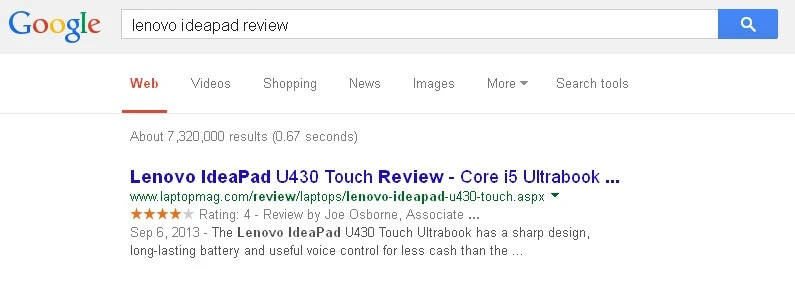
- Review / AggregateRating. Star ratings on a product. Independent product reviews still earn rich-result stars. Self-reviews on
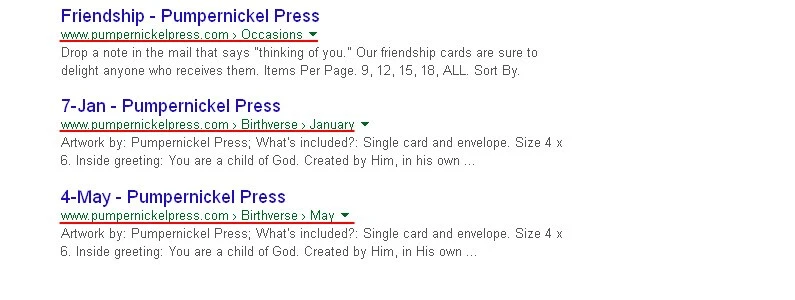
LocalBusinessorOrganization– your own brand reviewing itself on its own site – do not. - Breadcrumb. The hierarchy trail above the title. Useful for category sites and large catalogs.
- Video. Product demos, unboxings, and how-to videos, marked up with
VideoObject. - Article. For content-marketing posts on the storefront, including the article you’re reading now.
- FAQPage and HowTo. Still part of Schema.org and still useful for clarity, but Google has narrowed when these appear as rich results. They are not reliable revenue drivers on most ecommerce sites anymore.
- Local Business. For stores with showrooms, pickup locations, or service areas, marked up with
LocalBusinessand its subtypes.
None of these are guarantees. Rich results are eligibility, not entitlement; Google decides when to render them. But the eligibility has to be there in the first place, and it has to be accurate.
The point of all of it, from a store’s perspective: rich snippets communicate product value before a shopper ever clicks through.
How to Implement Rich Snippets in 2026
The implementation conversation has simplified.
Use JSON-LD. It is the format Google recommends, it sits in a single <script> block in your <head> or <body>, and it does not entangle itself with your visible markup the way microdata does. Microdata still works and many older ecommerce themes still ship it. Microformats and RDFa are legacy at this point; you should not be authoring new markup in either.
Whatever format you use, do not mix two formats for the same content on the same page.
A practitioner sequence that works:
- Decide what the page actually is. A product detail page, a category, an article, a video, a store location – the type drives every other choice.
- Pick the most specific Schema.org type that fits, then check Google’s current eligibility doc. Product, Merchant Listing, and Product Variant docs all live on Google Search Central and are updated regularly. Read the latest version before you write the markup.
- Add JSON-LD to the page. Most modern ecommerce stacks have a plugin, theme setting, or template hook for this. Hand-rolling is fine on smaller stores. Headless setups generally inject JSON-LD at the SSR layer.
- Validate. Use the Rich Results Test for rich-result eligibility and the Schema Markup Validator for general Schema.org validity. They check different things; run both.
- Watch Google Search Console. Under Enhancements, look for the relevant report – Products, Merchant listings, Breadcrumbs, Videos, and so on. GSC will flag missing required fields, invalid values, and indexing problems before they hurt traffic.
- Iterate. Fix warnings, fill optional recommended fields, and revisit when Google updates the docs. Schema is not a launch-and-leave job.
A minimal JSON-LD example for a product page:
<script type="application/ld+json">
{
  "@context": "https://schema.org/",
  "@type": "Product",
  "name": "Example Lightweight Hiking Jacket",
  "image": [
    "https://www.example.com/photos/jacket-front.jpg",
    "https://www.example.com/photos/jacket-back.jpg"
  ],
  "description": "Three-layer waterproof shell built for shoulder-season hiking.",
  "sku": "EX-JKT-001",
  "brand": {
    "@type": "Brand",
    "name": "Example Outfitters"
  },
  "offers": {
    "@type": "Offer",
    "url": "https://www.example.com/products/jacket",
    "priceCurrency": "USD",
    "price": "189.00",
    "availability": "https://schema.org/InStock",
    "priceValidUntil": "2026-12-31"
  },
  "aggregateRating": {
    "@type": "AggregateRating",
    "ratingValue": "4.7",
    "reviewCount": "142"
  }
}
</script>
That block makes the page eligible for a product-rich appearance on a non-transactional page, which Google displays at its discretion. To earn a merchant listing, you add shipping (shippingDetails), returns (hasMerchantReturnPolicy), and category-specific fields. To support variants, you wrap the variants in a ProductGroup and declare the variesBy axes (size, color, etc.). The current Google Search Central docs show the full required and recommended field sets for each.
Useful tools – all free:
- Rich Results Test (Google) – confirms rich-result eligibility for a URL or pasted code.
- Schema Markup Validator (Schema.org community) – checks general schema.org validity beyond Google’s rich-result subset.
- Search Console enhancement reports – the production source of truth once the page is indexed.
- Google Merchant Center – a separate but related surface. A product feed in Merchant Center plus matching structured data on the site lets Google reconcile the two, which makes the page more likely to surface in shopping experiences. The two are reinforcing, not redundant.
Why Rich Snippets Matter for eCommerce Stores
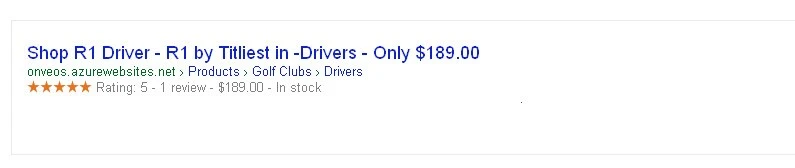
A buyer scanning a product SERP is doing trust-building work in their head, fast. Is this in stock? Is it well reviewed? Is the price reasonable? Will it ship to me in time?
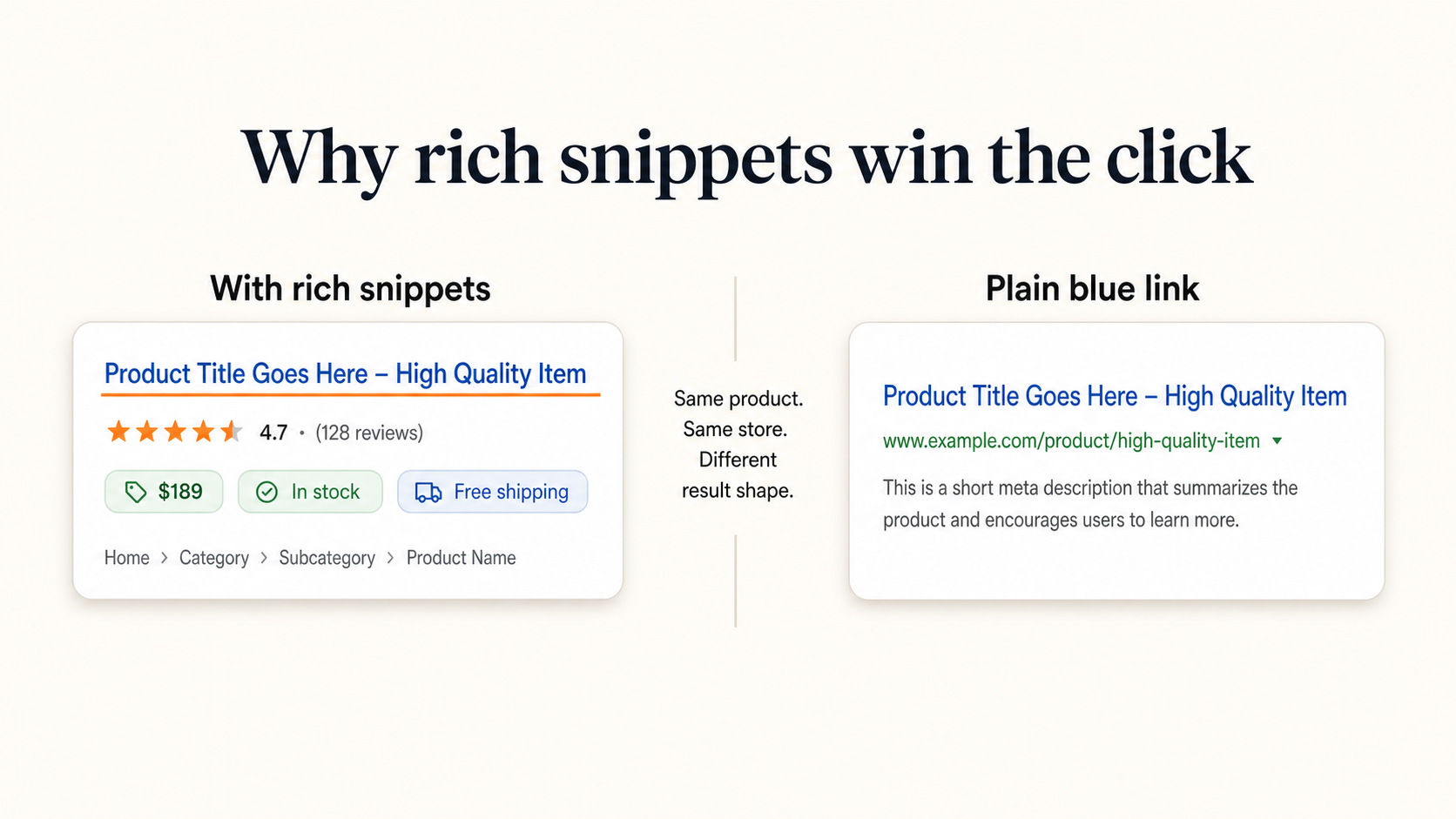
Rich snippets answer those questions in the SERP itself. They reduce hesitation about whether a result is worth a click. They also create a competitive edge: your result shows availability, price, and review stars while the competitor’s is still a plain blue link.
That visual gap is where rich-result work pays back. Pages that earn product rich results typically see meaningfully higher click-through than pages that do not, particularly in categories where most of the competitive set is still a wall of plain blue links. The exact lift depends on the category, the rendered SERP, and how much of your structured data Google chooses to display – but the direction is consistent enough that mature ecommerce SEO programs treat schema as core work, not a side project.
The fields that actually move the needle for ecommerce stores
The Product schema spec is large. Most of it is optional. Here is the shortlist of fields where most stores find their lift:
- Baseline:
name,image,description. Required on practically every result. - Product identity:
brand,sku,gtin(orgtin8/gtin13/gtin14),mpn,productID. Helps Google reconcile your product with the Shopping graph. - Commerce:
offerswithprice,priceCurrency,availability, andpriceValidUntil. The minimum for any commerce result. - Social proof:
aggregateRating(note the spelling) and product-levelreview. Independent product reviews only. - Merchant-listing extras:
shippingDetailsandhasMerchantReturnPolicyunlock the shipping and return windows in the SERP – increasingly visible and increasingly weighted by buyers comparing two near-identical listings. - Variants:
hasVariant,variesBy, andproductGroupIDon a parentProductGrouplet Google display size, color, and material variations cleanly instead of treating each SKU as an unrelated product.
Product snippet vs. merchant listing
Two practical buckets, one underlying Product schema:
- Product snippet is the lighter result type. The page exists, Google understands it is a product, and it may show price, rating, and availability.
- Merchant listing is the transactional result type for pages where buyers can complete a purchase. Same
Productschema as the base, plus shipping and returns and the other merchant fields.
If you sell direct, your product detail pages should aim for merchant-listing eligibility, not product snippet. The extra fields are not optional from a competitive standpoint – they are what fills the result with the information your buyer is using to decide.
Review snippet reality check
Independent product reviews on a product page remain eligible for review stars in the SERP. What is no longer eligible: LocalBusiness or Organization self-reviews placed on the entity’s own website. Google’s September 2019 review-snippet policy update closed that loophole, and the policy has been reinforced since. If your site embeds a third-party review widget about your own brand on your own pages, those stars are not coming back.
Your product reviews on your product pages, marked up with Review and AggregateRating, are still fair game.
Rich snippets and AI Overviews
Structured data is also part of how Google understands your page well enough to cite it in AI Overviews and AI Mode summaries. Adding accurate schema is not a guaranteed AI Overview ticket, but it is upstream of one. Pages that are unambiguous about what they are – product, price, brand, availability, reviews – give the AI surfaces less room to misread you.
Rich Result Eligibility Snapshot for eCommerce (2026)
| Schema type | What it can render in SERP | Best ecommerce use | Eligibility note |
|---|---|---|---|
Product (snippet) |
Price, rating, availability | Single product page, non-transactional | Required: name, image, and at least one of offers, aggregateRating, or review. |
Product (merchant listing) |
Price, rating, shipping, returns | Product detail page where buyers can purchase | Adds shippingDetails, hasMerchantReturnPolicy, and category-specific fields. |
ProductGroup |
Variant grouping | Apparel, footwear, electronics, anything with size/color/material variants | Use hasVariant, variesBy, productGroupID. Live since February 2024. |
AggregateRating / Review |
Star rating, review count | Product-level reviews | Self-serving LocalBusiness / Organization reviews on the entity’s own site are not eligible. |
BreadcrumbList |
Hierarchy trail | Category sites, large catalogs | Pair with site navigation; do not invent breadcrumbs that conflict with the URL. |
VideoObject |
Video thumbnail, key moments | Product demos, unboxings, how-to videos | Provide contentUrl or embedUrl, plus thumbnails. |
Article |
Article rich elements | Storefront content, guides, this article | Standard publishing metadata. |
LocalBusiness (and subtypes) |
Local pack details | Stores with showrooms, pickup, service areas | Self-reviews are not eligible. |
FAQPage / HowTo |
FAQ / how-to rich elements | Limited – brand or how-to content | Google has narrowed eligibility; do not assume display. |
Required and recommended fields per type are documented in the Google Search Central rich results gallery and the Schema.org reference.
Practitioner Checklist
If you run an ecommerce store and want to capture the rich-result lift this quarter:
- Audit your top-traffic product pages and confirm each has valid JSON-LD
Productmarkup. - Decide which pages should aim for merchant listing (transactional) versus product snippet (informational), and fill the merchant-listing-only fields where appropriate.
- Add
ProductGroupmarkup wherever you have real variants. Stop duplicating product pages for color or size. - Confirm
aggregateRatingis wired to real product reviews, not embedded brand reviews about the store itself. - Run every template type through the Rich Results Test and the Schema Markup Validator. Fix all errors and the high-impact warnings.
- Open Google Search Console, expand the Products and Merchant listings enhancement reports, and clear out warnings on a regular cadence.
- Keep a product feed in Google Merchant Center if you are not already; structured data on the page and the feed reinforce each other.
- Revisit annually, or whenever Google updates the structured data docs for a type you depend on.
Putting It to Work
Rich snippets are not a standalone SEO project. They are one layer on top of an ecommerce SEO program that handles the catalog architecture, product data quality, technical SEO, content, and reporting that make the rich results meaningful. For a wider lens on that program, our eCommerce SEO strategy guide covers how schema fits with the rest of the work.
If you are already running an ecommerce SEO program and just need someone to handle the schema audit and implementation, that is what we do every day.
FAQ: Rich Snippets for eCommerce
What is a rich snippet in SEO?
A rich snippet is an enhanced search result Google renders from structured data on the page – elements like a star rating, price, availability, or shipping window shown beneath the title and URL.
Do rich snippets help ecommerce SEO?
They help in two ways: they improve click-through on results that earn them by communicating product details in the SERP itself, and they help Google and AI surfaces understand your product pages well enough to display, recommend, or cite them.
What is the difference between a product snippet and a merchant listing?
Both come from Product schema. Product snippets are the lighter version for product pages where users do not purchase directly. Merchant listings are for pages where users buy and include extra fields for shipping, returns, and other commerce details.
Can I still get review stars on my product pages?
Yes – for independent product reviews marked up with Review and AggregateRating on the product page. What no longer earns stars is LocalBusiness or Organization “self-reviews” – your own brand’s reviews of itself, placed on your own site.
Do rich snippets help with Google AI Overviews?
There is no guarantee, but structured data helps Google understand your pages, which is upstream of whether you get cited in AI Overviews and AI Mode summaries.