By: Tristen Pursley
An SEO ranking drop is a symptom, not a diagnosis. Before you rewrite pages, undo a launch, blame a Google update, or start changing title tags across the site, you need to confirm what actually moved. Rankings, clicks, leads, and revenue do not always fall together.
I start with that distinction every time. I verify the ranking data, check the live search results, compare the movement against Google Search Console and GA4, then decide whether the loss is a business problem, a reporting problem, a technical issue, a content issue, or a broader market shift.
First, Confirm The SEO Ranking Drop Is Real
Rank trackers are useful, but they are not the whole truth. Location, device, personalization, SERP features, and tool timing can all make a ranking report look worse than the actual search result.
I usually start by checking Ahrefs, then cross-checking the same queries in Semrush. Next I inspect the live SERPs to see whether the reported ranking drop matches what a searcher would actually see. That extra step matters when Google is testing a result, when a featured snippet changes, or when one tool is reading a different location or device setting than another.
After the ranking data is verified, Google Search Console and GA4 answer the more important question: did the drop affect traffic or revenue?
For me, that is the real business filter. I focus on traffic and revenue more than I focus on the rank chart. If keyword rankings dropped across low-value queries but traffic, leads, and revenue stayed steady, the issue may not deserve the same response as a drop across revenue-driving category, service, or product pages.
Use this first pass to separate a ranking problem from a measurement problem.
| Signal You See | What It Might Mean | First Place To Check |
|---|---|---|
| Rankings down in one tool only | Tool setting, location, device, or SERP parsing issue | Ahrefs, Semrush, live SERP |
| Rankings down and clicks down | True visibility loss or CTR loss | Google Search Console |
| Clicks down but rankings stable | SERP feature shift, demand change, title/snippet issue, AI or zero-click effect | GSC query/page data and live SERP |
| Revenue down but rankings stable | Conversion, tracking, demand, product, pricing, or attribution issue | GA4, CRM, ecommerce data |
| Average position down but priority queries stable | Query mix changed | GSC page and query filters |
Do not skip this step. A clean diagnosis starts with knowing which number actually changed.
Classify The Shape Of The Ranking Drop
The shape of the drop tells you where to look next. A google ranking suddenly dropped overnight is not the same problem as every product category losing visibility over a quarter. A single keyword falling from position 4 to position 9 is a third pattern again.
Start by grouping the decline:
- One keyword dropped.
- One URL dropped.
- One folder or template dropped.
- One market, device, or location dropped.
- Non-brand rankings dropped, but branded rankings held.
- Clicks dropped, but rankings did not.
- Rankings dropped, but traffic and revenue did not.
- The whole site dropped.
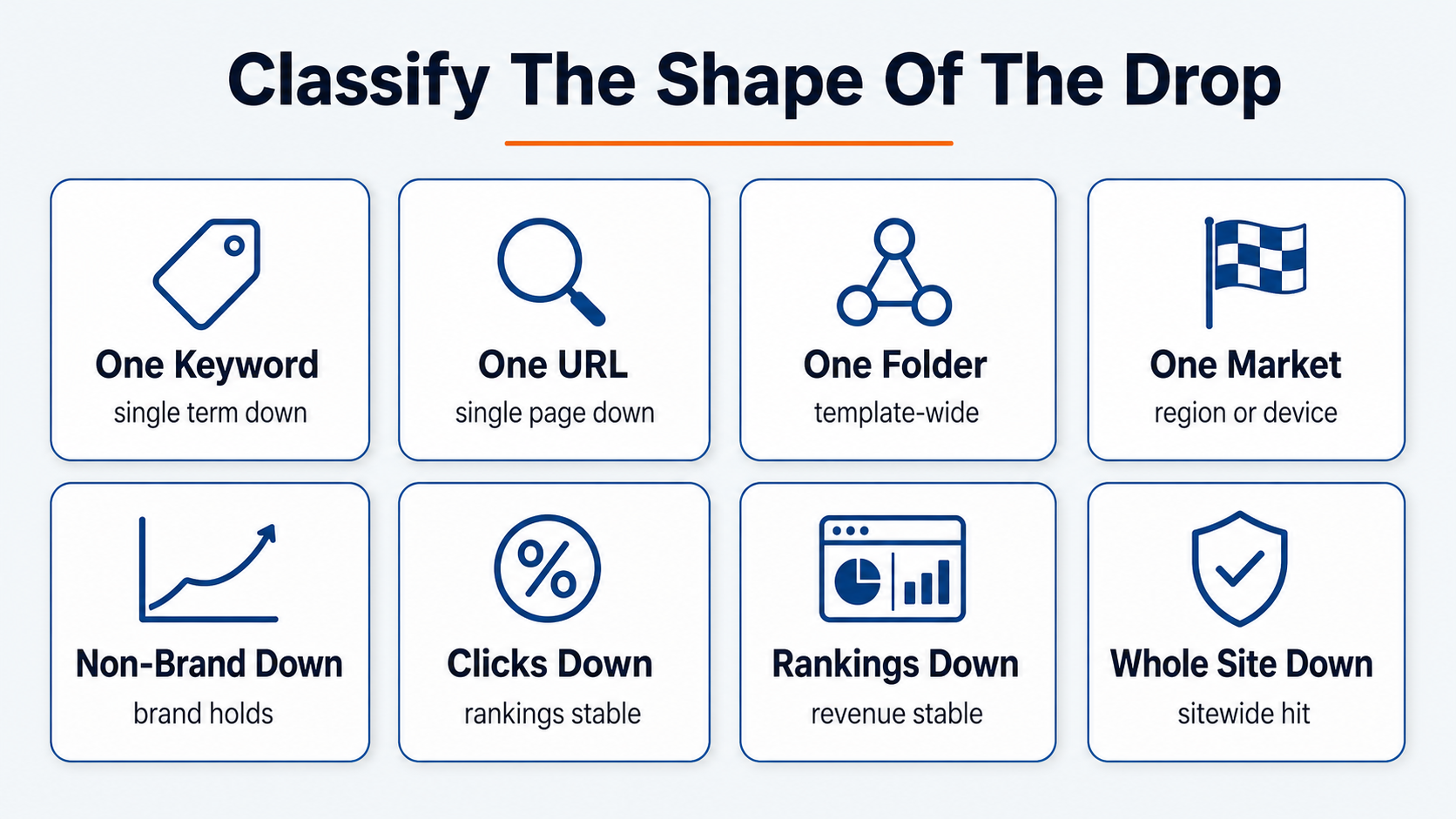
This classification keeps the response proportional. If one informational blog post lost rankings, you probably do not need to rebuild the site. If every URL using the same template dropped after a deployment, the technical team needs to be in the room quickly.
Business impact should guide urgency. A ranking drop on a page that never drove meaningful sessions or revenue is a different issue than a drop on a top category page, lead-generation page, or high-margin service page. The ranking report gets your attention. Traffic and revenue decide the priority.
Check Recent Site And Tracking Changes
Google does not need to change for rankings to fall. Your own site can create the drop.
Before I blame an algorithm update, I review what changed in the days or weeks before the decline. I ask developers, content owners, analytics owners, and platform managers. “Nothing changed” usually means no one has asked the right person yet.
Common triggers I see:
- Website launches, migrations, or redesigns.
- CMS, theme, app, plugin, or template updates.
- Redirect changes.
- Canonical tag changes.
- Noindex or robots.txt changes.
- Title tag, H1, or meta template changes.
- Navigation or internal-link changes.
- Content pruning or page consolidation.
- JavaScript rendering changes.
- CDN, firewall, or security changes.
- Analytics, tag manager, or ecommerce tracking changes.
This branch is especially important after a new site launch. I run into the same pattern often: a team launches a redesigned site and watches rankings drop in the weeks after, and the new build is the first place I look.
If a ranking drop lines up with a site change, investigate that change before you build a broader SEO theory. A broken redirect, removed internal link, changed canonical, or tracking mistake can look like an SEO decline from the dashboard. If the drop lines up with a recent migration, our website migration team sees the same pattern week after week: broken redirects, lost internal links, and template-level canonical changes are the usual suspects.
Rule Out Technical SEO Problems
Technical SEO issues can create sudden ranking drops because they change what Google can crawl, index, render, or trust. They are also some of the fastest issues to confirm.
I start with the basics:
- Did important URLs start returning 3xx, 4xx, or 5xx status codes?
- Did robots.txt block a section of the site?
- Did a noindex tag land on pages that should rank?
- Did canonical tags point important pages somewhere else?
- Did redirects create chains, loops, or dead ends?
- Did XML sitemaps drop important URLs?
- Did internal links to priority pages disappear?
- Did JavaScript hide or delay important content?
- Did server errors, firewall rules, or CDN settings affect Googlebot?
- Did Google Search Console report indexing, manual action, or security issues?
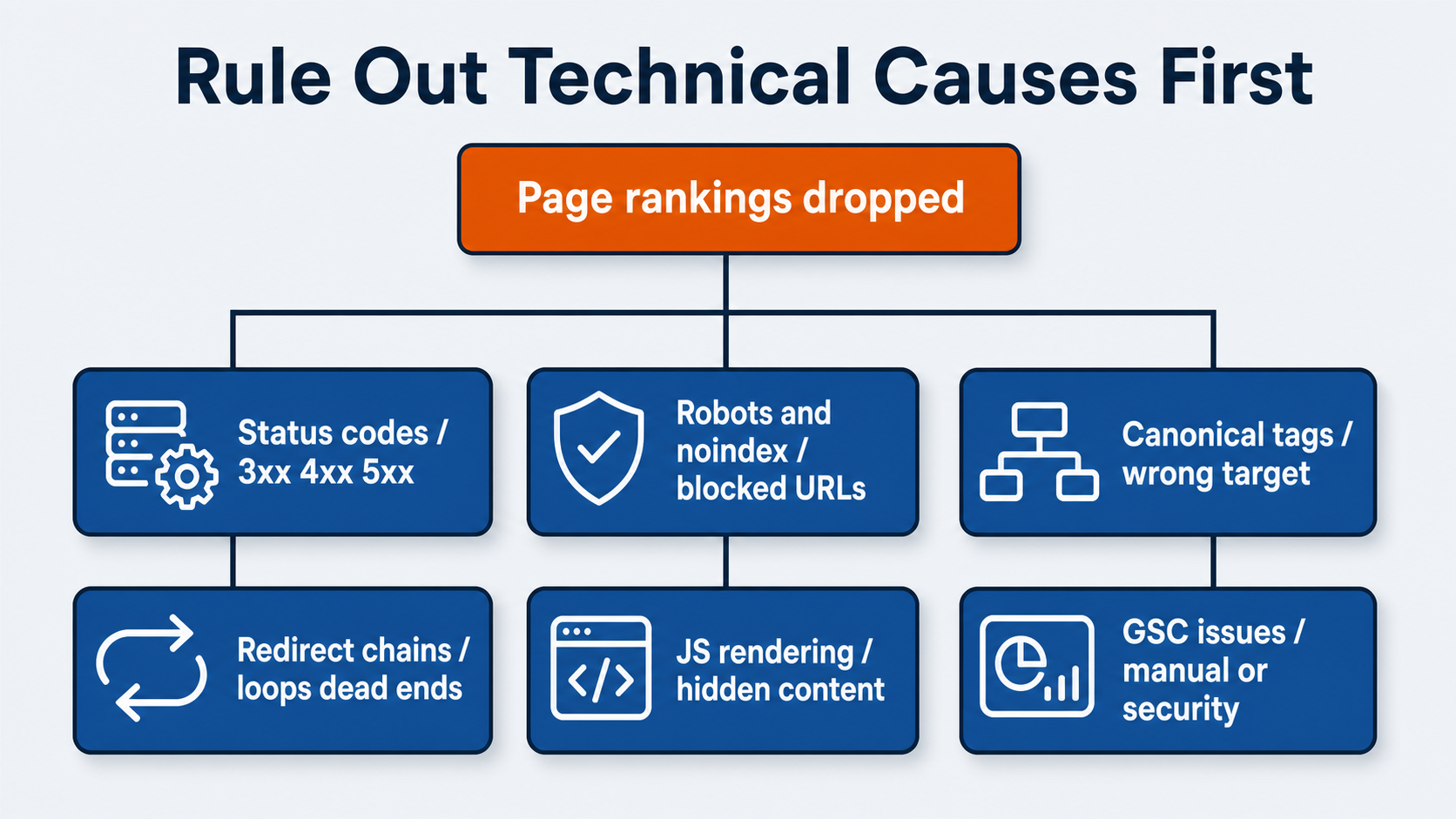
A few causes teams commonly miss, in my experience: UX concerns, old content, pages that have not been updated recently, and lack of internal linking. Those are not always purely technical, but they belong in the same diagnostic mindset. They are site-side problems you can test before you blame external forces.
A manual action is a different conversation than a regular ranking drop. If Search Console shows one, route it to a focused Google penalty recovery workflow rather than re-running the diagnostic playbook above.
Technical checks also help keep teams from overcorrecting. If a canonical issue is suppressing one page, a full content rewrite will not solve the root problem. If internal links were removed from a navigation or template, the recovery plan may start with restoring link equity to the right URLs.
Compare The Timing Against Google Updates
Google updates are real, and they can affect rankings. But timing alone is not proof.
When an update is active, I tell my clients quickly. The message I send is calm and specific: an update is rolling out, we are monitoring it, and it may take a couple of weeks before the impact is clear. During that rollout window, ranking movement can look worse than the final outcome. If you want the broader pattern, see our breakdown of how to tell if your site has been affected by a Google algorithm update.
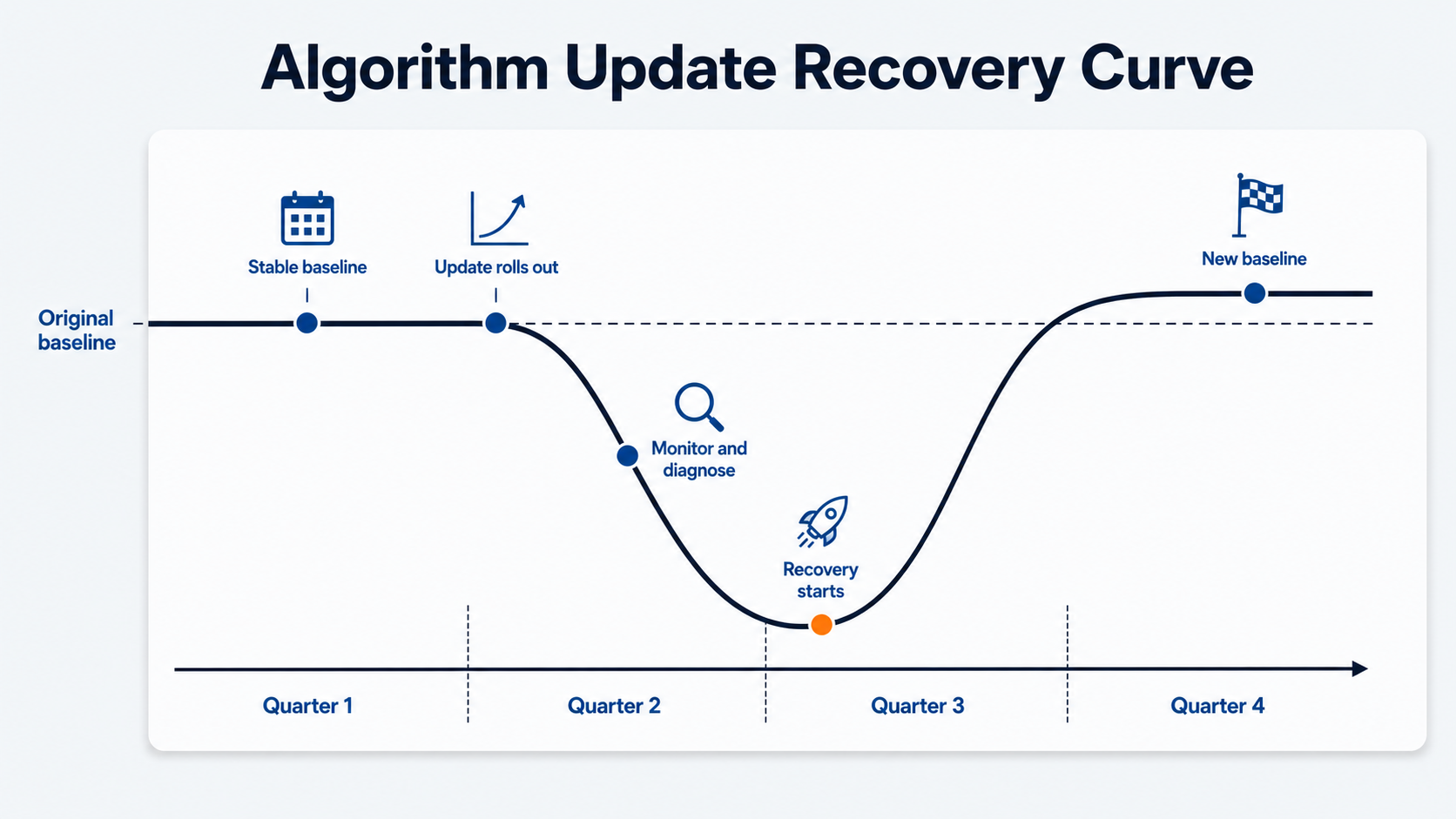
That does not mean I ignore the data. It means I avoid changing the whole site during peak volatility unless there is a clear technical or quality issue to fix.
I try to stay patient on purpose. I rarely start making immediate changes just because a client sees downtrends during an algorithm update. In many cases, rankings begin to rebound within a month or two. If rankings drop and do not start to recover after the first couple of weeks, then it is time to pivot from monitoring into a recovery plan.
The bigger the update, the more realistic the timeline needs to be. Some sites can stabilize in about a month. Larger updates that reshape an entire market or industry can take a full quarter to work through.
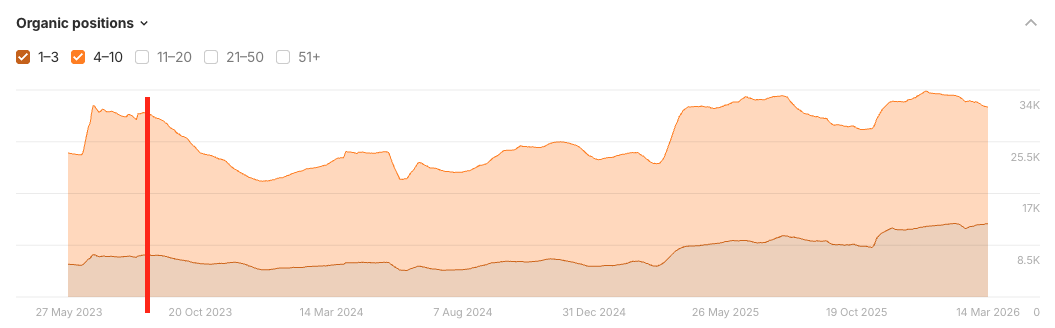
One of my clients in the pest-control space saw a major ranking hit after a late-2023 algorithm update. Rankings declined after the update, then recovered and eventually passed the pre-update baseline. Their top-3 keyword rankings are now nearly double the level they were at before the update. The lesson is not “wait forever.” The lesson is to diagnose carefully, make evidence-led changes, and give the recovery enough time to show.
Recheck SERP Intent And Content Freshness
Sometimes your page did not get worse. The search result changed around it.
If you have been asking yourself how to check why rankings dropped, the SERP itself is usually the answer you skipped first. Review the current SERP for affected queries. Does Google now favor product pages instead of articles? Are comparison lists, videos, forums, shopping modules, local packs, or AI Overviews taking attention away from blue links? Did a query shift from informational to commercial, or from broad education to a specific tool, category, or service?
If rankings stayed mostly stable but clicks fell, SERP changes are especially important. A page can hold a similar average position while losing traffic because ads, snippets, AI answers, shopping units, or stronger titles changed how searchers behave.
Content freshness is the next branch. Older pages can lose ground when competitors update examples, add better answers, improve UX, or build stronger internal support. I look for:
- Outdated examples.
- Old statistics.
- Thin answers to important subquestions.
- Missing comparison or decision criteria.
- Weak page experience.
- Cannibalization from another page targeting the same intent.
- Lost internal links after a redesign, navigation change, or content cleanup.
Check Internal Links And Site Signals
Internal links are one of the easiest things to break in a redesign and one of the hardest to spot from the rankings dashboard.
Internal linking deserves more attention than it usually gets. When important pages lose internal links, Google can read a weaker site-level signal about priority and context. A page can look unchanged in the CMS but still lose support from the rest of the site.
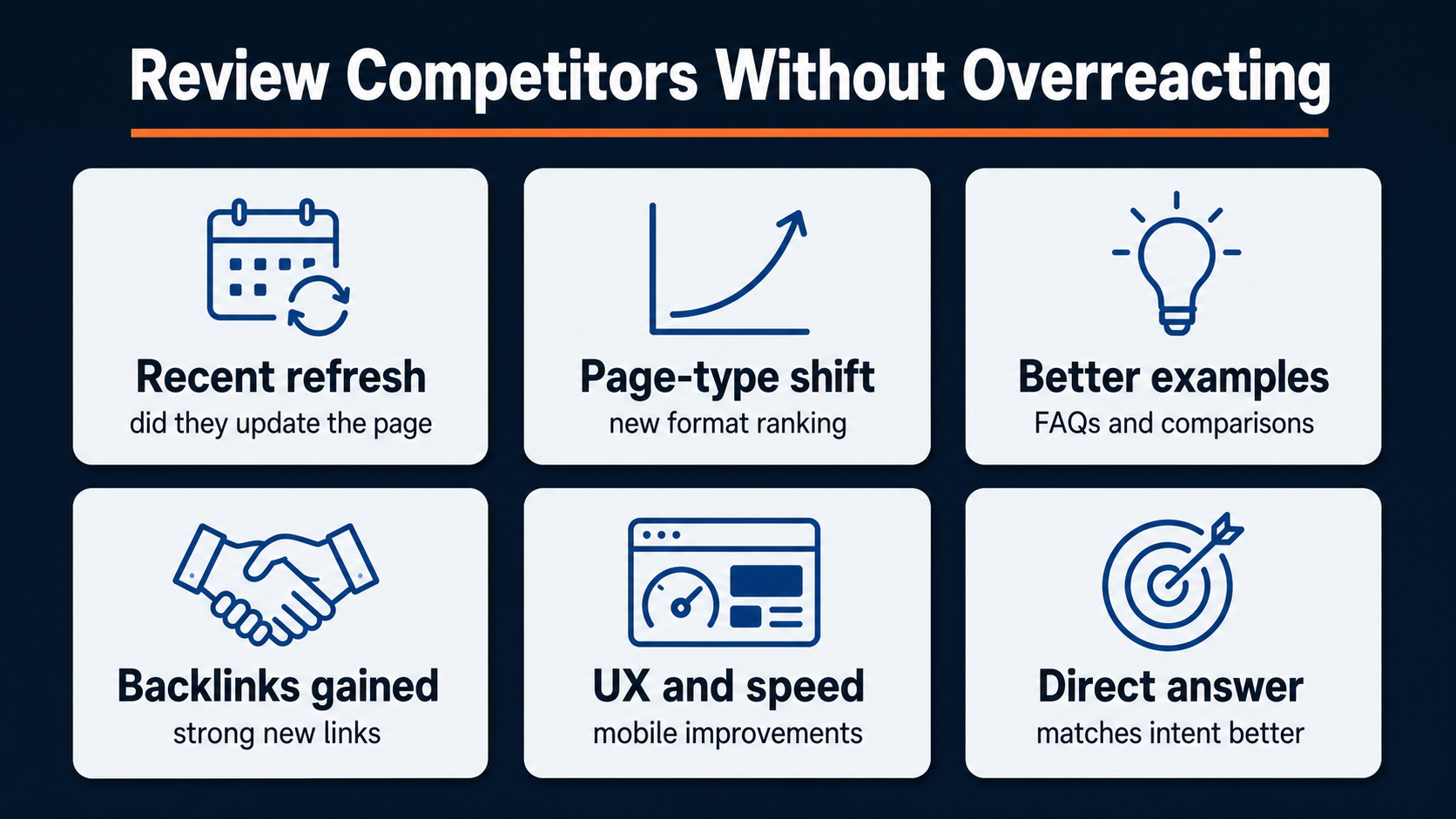
Review Competitors Without Overreacting
Competitor movement helps you understand whether the drop is isolated or part of a broader market shift.
After I validate a ranking drop, I check the main competitors in Ahrefs. If several competitors moved in similar ways, a Google update, SERP layout change, or market-wide shift may be involved. If one competitor gained while others stayed flat, I inspect what changed on that competitor’s page.
Useful competitor checks:
- Did a competitor refresh the page recently?
- Did Google start rewarding a different page type?
- Did a competitor add better examples, tools, FAQs, or comparison content?
- Did they gain strong links to the ranking page?
- Did their UX, speed, or mobile experience improve?
- Did their page answer the query more directly?
Backlinks are part of this review, but they should not create panic. Lost high-quality page-level links can matter. Broken redirects from linked URLs can matter. A sudden impulse to disavow links is rarely the first move I make in a ranking-drop investigation.
Competitor and backlink data should sharpen the diagnosis. It should not send the team into a dozen unrelated fixes.
Build The First Recovery Plan
Once the likely cause is narrowed, do not quietly change strategy in the background. Walk stakeholders through what the data shows.
When I lead a recovery discussion, I usually cover:
- What happened to the rankings.
- Which pages and queries changed.
- What happened to competitors’ rankings.
- What changed in traffic, leads, and revenue.
- Which causes have been ruled out.
- Which cause looks most likely.
- What the team is going to change.
- What outcome is expected.
- How long the turnaround may take.
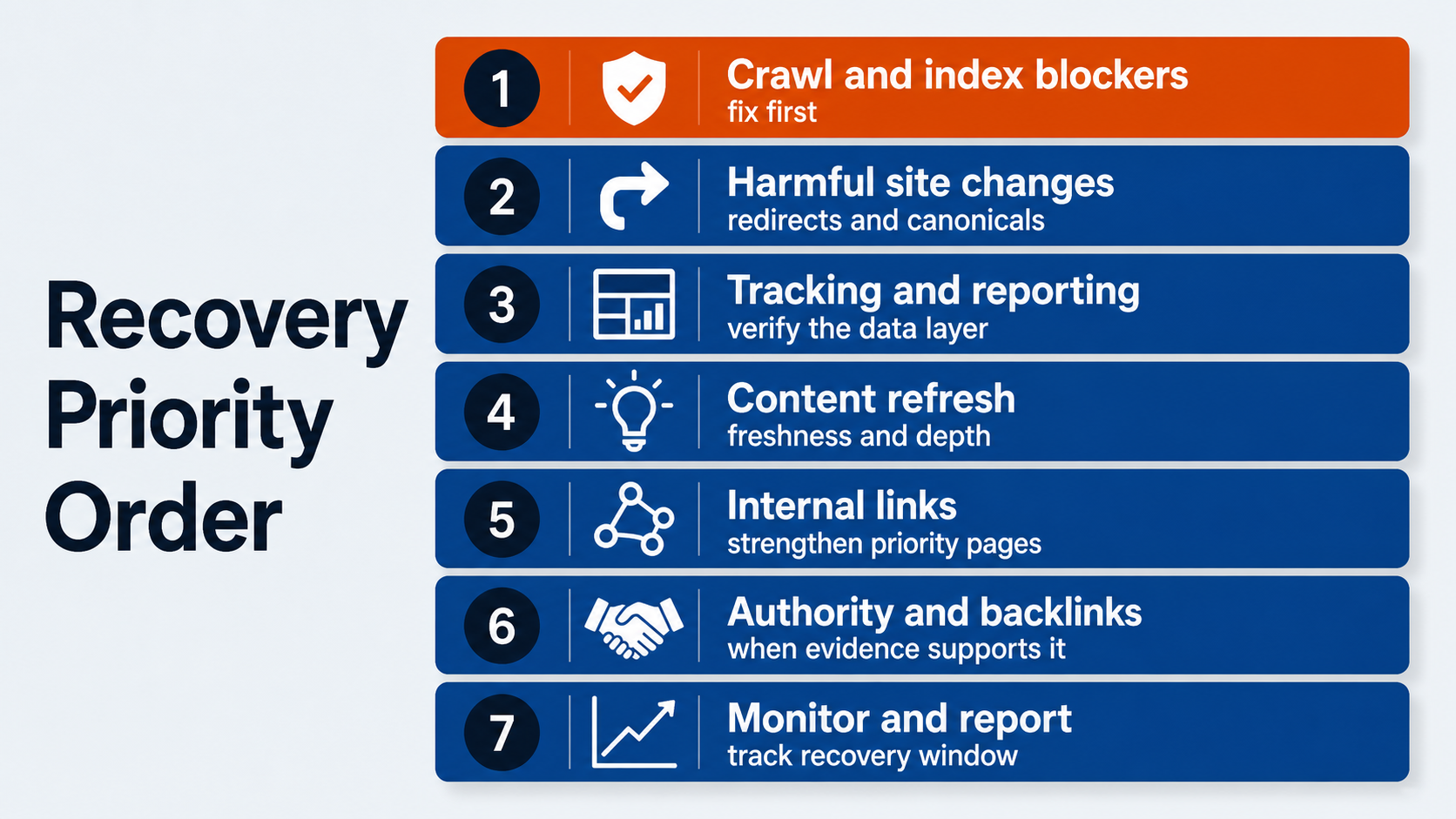
The order of work depends on the diagnosis, but the priority usually follows risk and reversibility:
- Fix crawl, indexation, rendering, manual action, or security blockers.
- Repair harmful site changes from launches, templates, redirects, canonicals, or internal links.
- Stabilize tracking if the reporting layer is unclear.
- Refresh or rebuild content when intent, freshness, or depth is the proven gap.
- Strengthen internal links to priority pages.
- Address authority or backlink issues when the evidence supports it.
- Monitor rankings, traffic, and revenue against the expected recovery window.
That is how to recover lost Google rankings without creating new problems. Patience matters, but so does ownership. Waiting is reasonable during update volatility. Waiting is not reasonable when a noindex tag, broken redirect, or lost navigation link is suppressing revenue pages.
When To Get Help Recovering Dropped Google Rankings
Get help when the drop affects revenue-driving pages, touches a whole folder or template, follows a launch or migration, or shows up alongside Search Console indexing, manual action, or security warnings.
You should also bring in SEO support when the team cannot separate ranking loss from tracking issues, SERP changes, content decay, competitor movement, and technical problems. Those threads overlap quickly, especially on ecommerce, lead-generation, and multi-location sites.
This is the kind of diagnostic work the OuterBox SEO audits are built for. We verify the data, find the cause, prioritize the fix, and stay with the team through the recovery plan. If the issue is technical, our technical SEO team can work with your developers. If the issue is content, internal links, or site structure, we can help rebuild the parts that need to hold up longer.
If your Google rankings dropped and the decline is affecting leads or revenue, start with a clear diagnosis. Then fix the right thing, and if you need help recovering lost Google rankings, that is what we built our SEO audit work to do.
Google Rankings Dropped? How To Diagnose An SEO Ranking Drop
Are You Ready to Rank #1
We’ll get back to you within 24 hours, Monday–Friday. Prefer to talk now? Call 1-866-647-9218 (9–5 EST).
Services
"*" indicates required fields
Frequently Asked Questions About Google Ranking Drops
Why Did My Google Rankings Suddenly Drop?
Google rankings can drop because of tracking issues, site changes, crawl or indexation problems, algorithm updates, SERP intent shifts, stale content, lost internal links, competitor improvements, or backlink changes. Confirm the data before you choose a fix.
How Do I Know If My Ranking Drop Is Real?
Compare your rank tracker against another tool, inspect the live SERP, then check Google Search Console and GA4. A real SEO issue usually shows up in affected queries, pages, clicks, sessions, leads, or revenue.
How Long Does It Take To Recover Lost Google Rankings?
Recovery time depends on the cause. Some issues stabilize in a few weeks after fixes or update volatility. Larger algorithm, content, technical, or market shifts can take a quarter or more to fully recover.
Can A Google Algorithm Update Cause Rankings To Drop?
Yes, a Google update can cause rankings to drop. But an update is not a complete diagnosis. Check which pages and queries dropped, whether competitors moved, and whether technical or content issues explain the decline.
Should I Rewrite My Whole Site After A Ranking Drop?
Usually, no. A full rewrite is a major move and can create new risk. Diagnose the drop first, then update the pages, templates, internal links, or technical issues that evidence points to.
Should I Disavow Backlinks After A Ranking Drop?
Do not start with disavow work unless there is clear evidence of a link-related problem. Review lost links, broken redirected URLs, and competitor authority first. Most ranking drops are not solved by panic disavow files.