By: Jeff Hirz
With more than a decade of article writing experience, I’ve perfected the format and elements that it takes to write a blog post or article that ranks high on Google. And you know what? Writing great SEO content is not as complicated as it seems. It takes not only writing awesome content, but including the elements that make the article interesting to readers and give authoritative SEO signals to Google and other search engines.
SEO content development gets much easier when you separate the work into a few practical decisions: what to write, who it helps, how deep it needs to go, and which signals make the page clear to Google.
In practice, SEO content development is the workflow behind writing web content for SEO: choose the topic, match search intent, structure the answer, and optimize the page before publishing.
There’s a lot of AI content out there now. It’s called AI slop, right? We all know it. Google knows that AI slop is out there. AI content has a place, but you always need a human in the loop. There needs to be an editing process where you add data and stats and links and pictures and videos. Where AI really works, from a content production perspective, is helping create the briefs. But the writing, at the end of the day, is always going to be better if a human being did it, with a little bit of flair, a little bit of creativity, with real-life experience and examples. Google says its systems are built to reward helpful, reliable, people-first content, not pages created mainly to manipulate rankings.
“What is going to win is the human touch. It’s the proprietary research. It’s the personal experience.”
Craig Smith, Chief Strategy Officer, OuterBox
SEO Content Development Starts With Useful Content
All website content has a purpose. Whether the purpose is to drive new leads or drive new sales, in the end, an article or a blog post should affect a company’s revenue in some way. Maybe the article helps boost the main landing page by boosting the domain’s overall authority. However the article is being strategically used, in the end, it should affect sales or the company’s main objectives.
A strong article usually does one of three jobs for the business.
- It drives leads or sales. If someone is searching for pricing, chances are they are in the buying cycle, meaning they need an expert. Our SEO Pricing article not only ranks well, but drives leads. You can see via Google Analytics that for an article page it converts very well and drives around 75-100 leads per year.
- It builds topical authority. “SEO Trends” isn’t a keyword people are searching if they want to hire a company, but it’s a good piece to put out there to become an authority in the industry. It also may get a few links, but probably not a ton.
- It earns natural links. Mobile eCommerce Stats, a page packed with stats, is just asking for links. Get a page with stats ranking and the links will start rolling in.
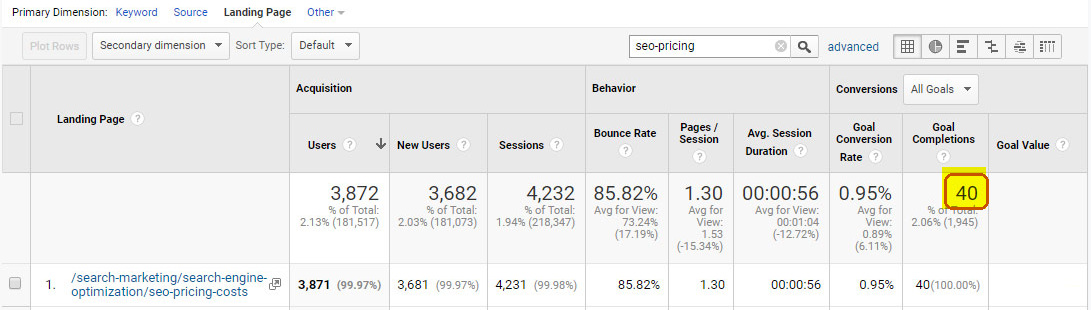
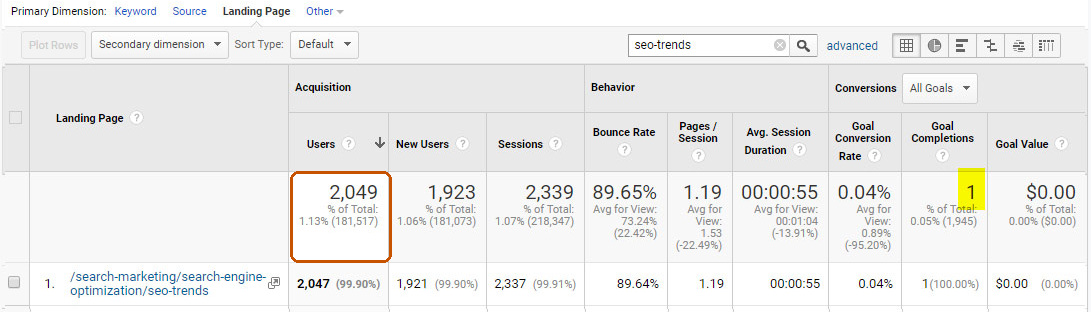

Blogs are important, but they sit under the larger umbrella of content. If we have one blog about a service, but ten blogs about ten other services, and we’re trying to get keywords for that one service to rank, only one blog out of those ten is helping us. The other nine are talking about other topics, and they’re going to have no bearing on it.
Choose a topic with search demand and business value
The first step to building great content is to choose a topic based on research. That means you don’t write content just to “have more content”; you write content to answer a commonly searched question, problem, or highly searched interest. Choosing the right topic is where the foundation of success begins. One easy way to choose topics is to look at Google. Let’s say I’m going to write an article around the topic of search engine marketing. I can search main phrases or begin searching relevant questions and see what Google spits back as recommended searches. When they are recommended searches, those phrases get a good amount of search volume, and you can drop a bunch of different questions and phrases into a keyword tool to view the volume and be sure. Volume isn’t everything, though. For SEO services, that means separating demand from distraction. A lower-volume phrase may be perfect because the searcher has a real problem and needs a path forward.

At OuterBox, we dig into the search results. The organic landscape is important, and so is the AI overview: we look at what specific content is being pulled into that snippet and what we might be missing on our own site. Then there’s People Also Ask. As we’re building more content onto a site, we want to make sure we’re answering any questions that we can, per page. We also ask clients what’s glaring on their end: what people keep asking about that we don’t have on the site, or what they keep asking about even though it is on the site.
Before drafting, ask:
- Would our target audience find this article useful if they came directly to our site?
- Does the topic connect to a service, product, problem, or decision we can actually help with?
- Can we add experience, examples, process, data, or perspective that a generic article cannot?
- Is the page meant to drive leads, build authority, earn links, or support another page?
If you cannot answer those questions, the article is not ready.
Match the search intent before writing
Search intent is the reason behind the query. Even though a question or focus keyword may have a lot of search volume, consider the search intent. Will the person who is searching this be ready to take action on what the website is selling? A lot of people start with the big questions: what is it, do I need it, what are the benefits? Content that answers those questions helps you understand where people’s mentality is. But you have to decide whether that intent is where you want them, or whether you’re trying to drive them toward becoming a customer.
If you miss the intent, the article can be well written and still fail.
That’s why, before we write, it starts with research and analysis: competitor analysis, SERP analysis, seeing what competitors have on their pages and what’s showing in the search results, so we’re getting all of those different features and criteria into the content. Basically, all the stuff on the page that Google’s going to crawl. That’s the simplest way to think about it.
Do not copy the structure because everyone else uses it. Use the SERP to understand expectations, then write the version that actually helps your reader.
Decide the right depth, not a target word count
Google specifically warns against writing to a target length because you heard Google has one. It does not.
The better question is: how much depth does the reader need to solve the problem?
Think about search intent and look at the websites that already rank for the key phrases you’re going after. Are they short form? Long form? If your article is a quick “how to” guide, then maybe it should be shorter, with “Step One”, “Step Two” formatting. If you’re trying to rank for “Decking Materials” as an example, chances are you’ll need a long-form article that goes into detail.
Use Statistics To Make Articles for SEO More Credible
These days there are statistics on everything, and people love seeing them. Including stats within content not only makes it more engaging and credible, but it makes it way more likely that someone will link to it as a reference.
They can also make a page weaker if they are stale, unsourced, cherry-picked, or dropped into the copy just to look authoritative.
So, how do you include stats? Simply insert them into your content or make statistics call-outs. If they are called out, more people will notice them and more people will link to the page:
- A highlighted stat. A very simple way to make sure a stat or anything important is read is to highlight it.
- A stats box. Including a big group of statistics using bullet points within a call-out box is a great way to get attention, and maybe even land featured results.
- A comparison table. Tables work well when the reader needs to compare factors, thresholds, channels, or page types. If it’s in a table and organized, Google is more likely to help that rank.
- An infographic. It doesn’t need to be super high design or amazing looking, just easy to view.
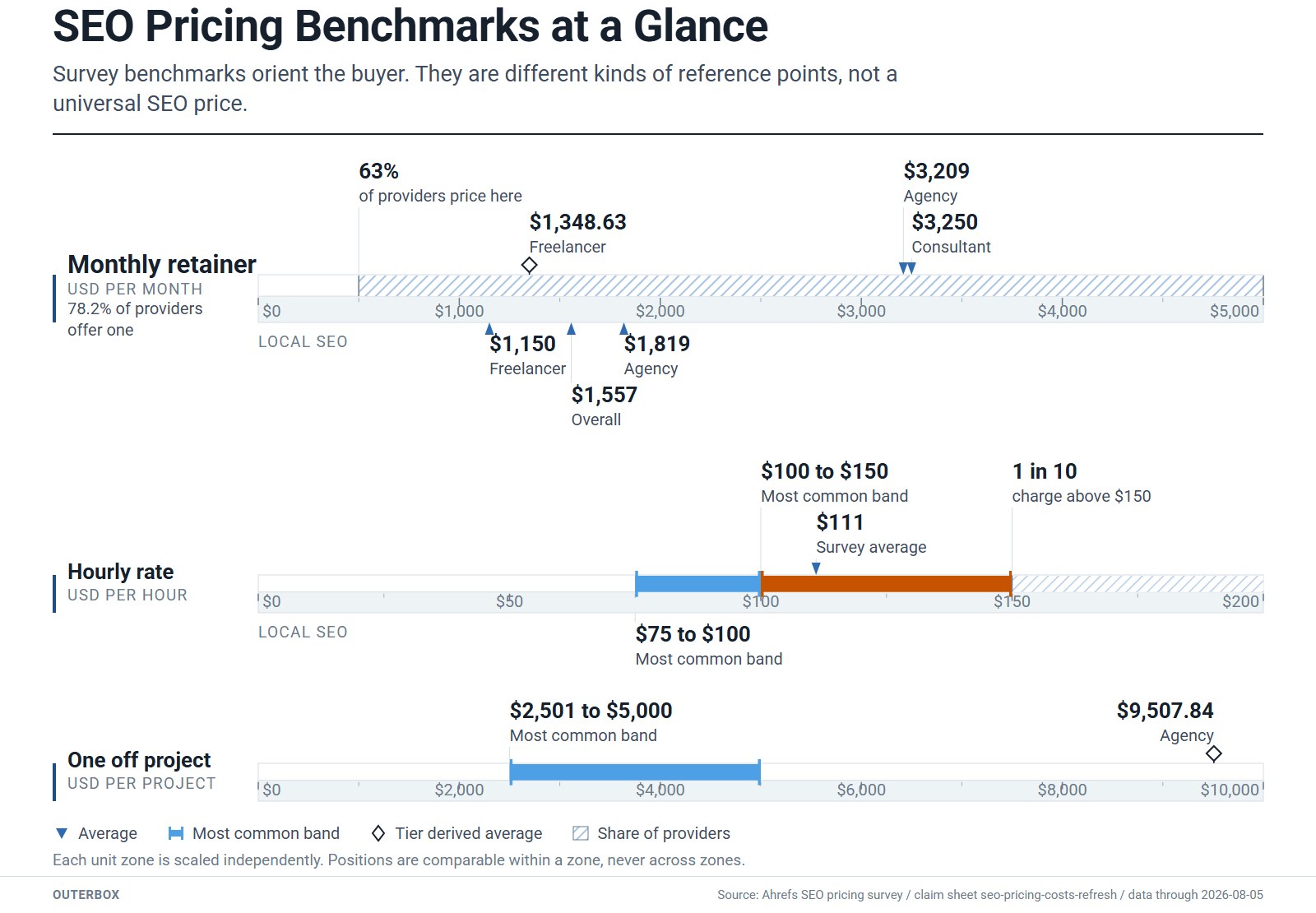
A statistics-heavy asset can outperform normal articles because publishers need sources. That only works if the numbers are real and the page is maintained.
For each number, record the source, date, and context. If it comes from a third-party study, link to the source.
Use Images and Screenshots To Clarify SEO Articles
It’s probably common sense, but far too often I’ll see an article or blog post that has no images, or just a banner at the top of the page. It doesn’t look very inviting. Honestly, it looks like one of those cheap paid guest posts. No matter how good the content is, no one will end up reading it. And if a keyword is pulling up a search result with image extensions, the small images next to the title, and our page doesn’t have an image, that’s something we’ll want to implement, whether we put an image on that page, a carousel or a slideshow.
The strongest SEO article visuals are usually practical:
- Screenshots that show a tool, SERP, report, form, dashboard, or page element. Including screenshots when at all possible is a perfect way to show what you’re talking about.
- Annotated examples that point to the thing the reader should notice.
- Simple diagrams that explain a workflow or decision path.
- Icons that help scan a list without pretending to be proof. They call out that a visitor should look at something and give visual context to what you’re describing.
Google’s SEO starter guide gives two useful rules here: place high-quality images near relevant text, and write descriptive alt text that explains the relationship between the image and the content. That is good accessibility and good SEO.
Use Bullet Points, Lists, and Tables for Scanning
Paragraphs and paragraphs of content get boring. Not only can it get boring to read, but it just looks boring to read. Some people like to read a whole article, but most people want to browse and pick up on the points they feel are most important, so highlight them!
A clear H2 tells Google and the reader what the section covers. Sometimes it’s small things, like using numbers instead of bullets, because Google likes numbered lists.
Use structure on purpose:
- Use H2s for the major subtopics.
- Use H3s when a section needs a specific question, step, or sub-point.
- Put a direct answer under question headings.
- Use bullets for categories, options, examples, or short rules.
- Use numbered lists for sequences.
- Use tables when comparison is the point.
If a section is long, you can use jump links, or collapsible content: break it up into sections that are condensed at first, so you see the item name, and when you click on it, it drops down to the related images and links.
Structure SEO Article Answers for Featured Snippets
You’ve put all of this time into creating an article or blog post. Wouldn’t it be amazing if it ranked at the very top of Google? Google’s goal is to provide a quick answer or insight into a search, and below the answer they link to the page, like a normal search result. So Google wants a couple of things on your page: first, you have to provide the answer, and second, that answer needs to be easy to find on the page.
When you type a keyword in, there are all these different features in the results: featured snippets, an image pack, a People Also Ask section, reviews, videos, a video carousel. If we don’t have content that can fall within that People Also Ask section, that’s where we put content with the language that speaks to the questions users are typing in, so we can show up there too. You cannot mark your page as a featured snippet. Google says its systems decide whether a page is a good fit for a user’s query and elevate it when appropriate.
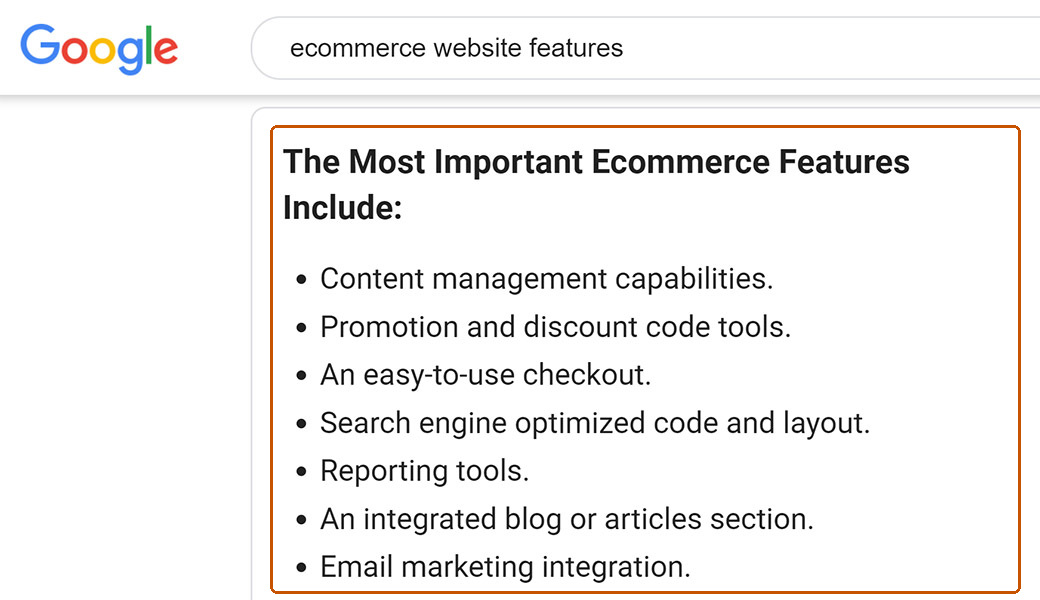
What you can do is make the answer easy to extract.
Use a heading and a bullet list: Google knows a heading is usually very easy for a visitor to see, and that people’s eyes are drawn to bullet points. Or use a heading with a short-ish paragraph below it. Google will look to see if you are quickly and succinctly answering the question below the header. Most of the time, a heading with 2-4 sentences below it is what tends to appear as a featured result.
Include Video When It Clarifies the Topic
Most of the time there are videos on YouTube around the topic you’re writing on, and including them in your post could make your page much more engaging. It can be a gap, too. We’ve looked at key product terms where none of the competitors had video content, which is a really good opportunity to fill that gap before they do. Even one or two short educational videos, like an explainer of a topic that’s already a successful blog, can start appearing in those search results and even in the AI summaries. Short-form video is another type of content that’s being embraced by Gemini and by LLMs, something that should be in your strategy.
Do not add video just because the page feels plain. Use it when it makes the article more useful.
Good video use follows the same rules as good image use:
- Place the video near the section it supports.
- Add text around the video so the page still works without watching it.
- Use a clear title and description.
- Don’t include a video that shows a competitor’s branding, talks about a competitor or somehow makes the site look bad.
- Do not send the reader to a source you would not cite in the article.
For videos, we want those to live on YouTube or a service like it, and we always recommend embed links. That way the video isn’t affecting your page speed and load, and you have the opportunity to show up when people are searching keywords related to that video. If you have to upload an MP4 file, keep it under 10 seconds, because an MP4 can have a really negative impact on page load speed.
Link Internally and Cite External Sources
Internal linking is SEO 101, but most people never think about external linking. It’s very important to do both. We always want to stay up to date on internal linking, to help crawlability and distribute link equity across the site, making sure pages are pointing to each other, especially when we’re implementing new content. If you have a page that you think deserves to rank, you’d want to add more internal links pointing to that page.
A few internal and external linking tips:
- Add internal and external links throughout the entire article. If you’re adding links to boost pages on the same domain, don’t stuff all of these links into the final paragraph. Sprinkle them in naturally throughout.
- Link to pages that are around the same topic as your current page.
- Link to service pages, articles, and anything that might be relevant.
- Don’t always use the same anchor text. Make it natural and switch it up.
- Link out to authoritative websites.
External links matter for a different reason. They let the reader verify a claim, read the original source, and understand where a statistic or rule came from. For SEO guidance, that often means Google Search Central, Search Console documentation, Schema.org, or the original research publisher.
When we build a blog calendar, we target blog topics that relate to your priority service pages, so we can incorporate strategic CTAs and internal links to those service pages. That’s not only to move people through the funnel to the service page; internal links are a longstanding SEO strategy to give some link juice to those service pages to help them rank better. Link placement should follow the reader’s next decision, not a fixed link quota.
Build Content Wheels Around SEO Articles and Core Topics
It’s really simple to link from one article to other articles that are similar. Not only is this great for building internal links, but it shows Google and your readers that you have even more content around the topic or your industry. Developing content wheels and interlinking your content is a simple way to use one piece of content to boost another. Also, if someone gets to the end of one article and wants to keep going, you’re suggesting more relevant content for them. Always pick relevant articles to link to; don’t just create a content wheel for the sake of linking to anything. Think, “if someone read this article, would they be interested in reading these others?”
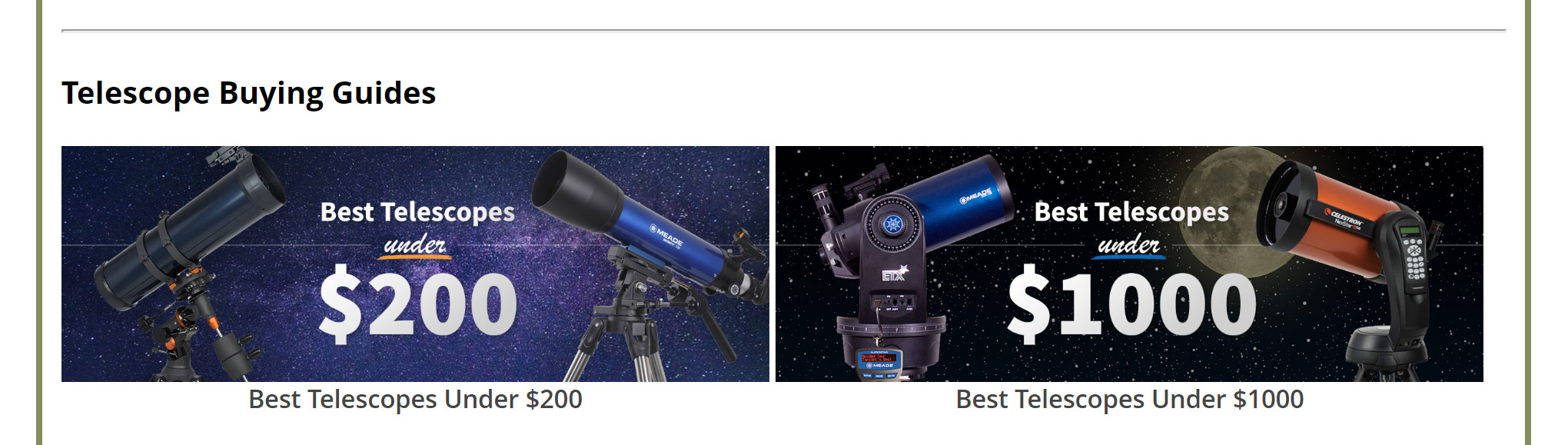
Today, many teams call this a topic cluster. Topic clustering is still a thing. We still have to cater to that. That has not gone away with the advent of LLMs. A reader who lands on an article about SEO content development may also need an on-page SEO checklist, help with SEO copywriting, or a broader content marketing services plan. Those links are useful because they match the reader’s path.
Optimize the Page Elements Before It Goes Live
Anytime you’re building a new page of content, that content has the potential to rank in Google. It’s important to include all of the basic SEO optimizations.
Keyword research
My number one rule when doing keyword research is use common sense! Think to yourself, what would someone search for when looking for an article on this topic? Use Google’s suggested search and keyword tools to look at search volume. Make a list of 3-5 keywords you want to target, as you’ll be integrating those keywords into the SEO elements on the page. If you were writing about SEO content development, the primary target would be that phrase: seo content development.
URL
Use a clear URL when creating a new article. You would never want the URL to have a year in it, because when the next year rolls around, the URL still says the old one. That’s why we try to keep URLs the same.
“Your URL for Google is like your home address. You can change things in the room, you can repaint it. That’s like changing things on a page. But if you move and you have a different address, Google has been going to this place, it doesn’t know now to go to this place.”
Shelby Doerries, SEO Team Lead, OuterBox
Title tag
Google says it can use the title element and other page headings to generate that title link, so your title should be clear, unique, and accurate. Tip number one for an optimized title tag: don’t just use the article or blog post name! Very often we’ll see a page title that follows the format of “Blog Post Name – Company Name”. It is important to write a unique title tag and start that title with your main keyword or main question. For the title tag, we want to make sure it’s anywhere from 60 to 70 characters.
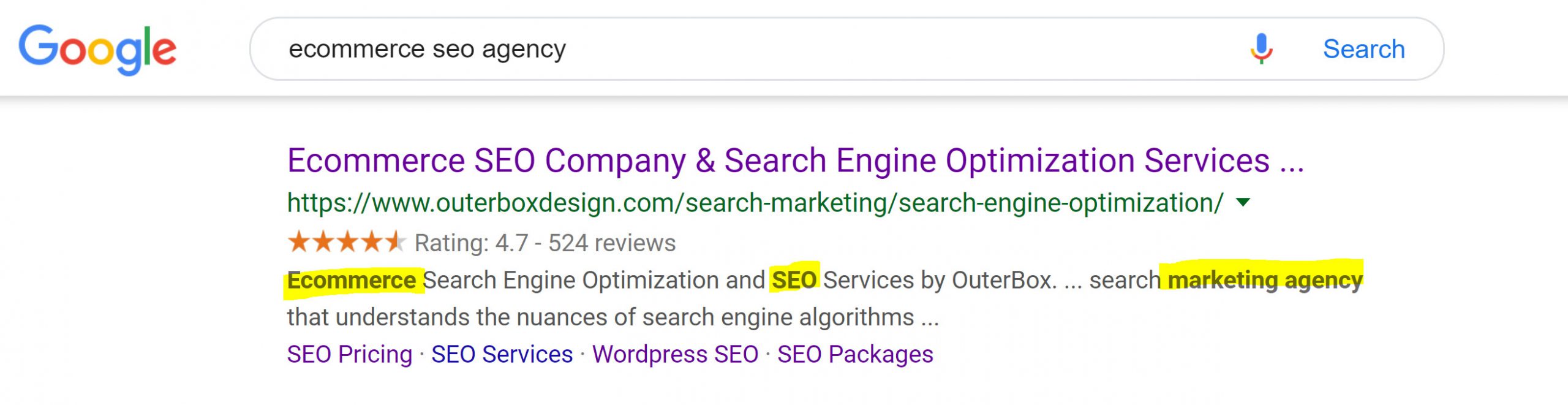
A good SEO title starts with the main topic, then gives the searcher a reason to click. For example:
SEO Content Development | Writing Articles and Blog Posts - OuterBox
Meta description
Meta descriptions are no longer a ranking factor. What they do is give the crawlers information on what the page is about. More often than not recently, they’ve been getting overwritten, but at least you can try to control the narrative and give Google as much information about the page as possible. If you don’t give them a meta description, they will create one for you, and that leaves it up to them to understand the page well enough to write it. A meta description isn’t about getting all of your keywords in there, but including keywords can be beneficial, and they often get bolded on Google. Google says a good meta description is short, unique to the page, and includes the most relevant points.
Write it for the searcher.
H1 and H2s
The H1, usually the main headline and name of your article or blog post, should always include the main keywords that you’re looking to rank for. If not optimized, an H1 like “How Much Is SEO?” would lower the ability to rank for phrases such as “SEO Pricing”, “How Much Does SEO Cost?” and “SEO Costs”. There’s only ever one H1 on a page. And on a page that’s already live, if you change the title or the H1, you can affect keywords, traffic and rankings.

Similar to the H1, you’ll want to optimize your H2s using the same thought process. Typically H2s are the headers for each content section, and H3s are the headers for the sections within a section (phew, that was complicated).
Image alt text
Don’t leave those image ALT tags blank! Write alt text that describes the image and its role in the article. Alt text is for accessibility first.
It’s really important for crawlers and for people with accessibility needs: anyone using a screen reader won’t get any information about an image without it. Part of our optimization process is making sure file names and alt text are updated, getting rid of any sizes and measurements in the file name and being as descriptive as possible with the alt text. For charts and diagrams, make sure that you have proper alt tag definition, as that will be leveraged by Google to help understand them. Do not jam a keyword into every alt attribute.
AI search readiness
Google says the same SEO fundamentals apply to AI Overviews and AI Mode. There are no extra technical requirements, special AI files, or special schema required to appear in those features.
That does not mean you ignore AI search. It means you do the fundamentals well:
- Make important content available as text.
- Use internal links so related pages are findable.
- Support text with relevant images and videos.
- Keep structured data aligned with visible page content.
- Write clear sections that answer specific sub-questions.
- Add original experience, examples, and proof instead of summarizing everyone else.
“People are asking much longer questions, having more conversations with ChatGPT than they are in Google.”
Tyler Cook, SEO Strategist, OuterBox
One of the most effective tactics is architecting content around real questions: going through your category pages, product pages and service pages, and making sure that you’re addressing genuine user queries, what folks are truly asking about. If someone’s going to have that question, you can only do good for your business by answering it in a well-structured content block. That’s the strategy behind having FAQs and headers that are a little longer and match those longer questions. Those tactics also help SEO, but they’re a little more tailored toward AI search. That is another reason SEO content development has to be planned before drafting starts.
SEO Content Development Checklist
Use this before you publish or refresh an article:
- Define the article’s job: leads, authority, links, education, or support for another page.
- Confirm search intent by reviewing current results and real customer questions.
- Pick one primary keyword and a short list of secondary phrases.
- Build an outline that answers the reader’s main question first.
- Add stats only when they are sourced, current, and useful.
- Use screenshots, diagrams, or video where they clarify the work.
- Structure sections with H2s, H3s, lists, tables, and direct answers where appropriate.
- Add internal links where the reader naturally needs a next step.
- Cite external sources for claims, stats, and official guidance.
- Review the URL, title tag, meta description, H1, H2s, and image alt text before publishing.
At OuterBox, a common workflow for new content that’s useful for most of our clients is that we collaborate with you on the direction of a new piece: what the goal would be. Our team goes and pulls competitive research, because we can look at who’s talking about what and what variations would be worth ranking for. We distill that down into an outline. We call it a content guide: these are the topics we see being rewarded, and this is what competitors are speaking to. Whoever is writing fills that in, then we come in and optimize the content, give it a final approval to make sure it’s still on brand and in your tone of voice, publish it, and help make sure it gets indexed.
If the article is already live, it helps to clean house first. Analyze the blog section and see if any pages are getting next to no traffic, or only a few impressions every month, and decide if it’s really content worth having on the website. If not, either remove that blog and redirect to a more relevant one, or update it. We look at how much traffic each blog is getting, its engagement and its current rankings to identify the biggest opportunities for optimization, and blogs that maybe aren’t reaching the right audience can be merged with another one.
Build SEO Articles To Hold Up After Publishing
SEO content development is not about publishing as many posts as possible or finding one trick Google likes. Look at your content. Put yourself in the user’s shoes. Is it good? Is it the best that’s being referenced in a ChatGPT result? And if not, you need to level up the content that’s targeting that specific keyword or theme. It’s something you should look at again every six to 12 months: check the search results and the competitors to see if different results are popping up for the keywords you’re targeting, if page titles have changed, or if Google is rewarding a different keyword variation. When a new blog goes live, just let us know, and the strategist goes in and does all the optimizations that need to be there for a newly published blog.
If your content library needs that kind of structure, OuterBox can help. If you ever have questions about whether it’s the right target keyword for a blog, or you just want to send over a topic, we can do the keyword research for you, so we’re targeting the right keywords from the get-go.
FAQ About SEO Content Development
What is SEO content development?
SEO content development is the process of planning, writing, structuring, and optimizing content so it helps readers and gives search engines clear signals. It includes topic selection, search-intent review, outline planning, source use, internal links, metadata, and post-publish refreshes.
How long should an SEO article be?
An SEO article should be as long as the topic requires. Google does not set one target length for ranking. A short answer may rank if it fully satisfies intent, while a complex guide may need examples, screenshots, sources, and a checklist.
Do featured snippets still matter for SEO articles?
Featured snippets still matter because they can put a concise answer above standard organic results. If you’re showing up in multiple spots, in the organic listing, People Also Ask and the image feature, the odds are people are going to go to you over somebody who just has one listing. You cannot mark a page as a featured snippet, but clear headings, direct answers, lists, and tables make your content easier for Google to evaluate.
Should SEO content include images and video?
SEO content should include images or video when they help the reader understand the topic. Screenshots, diagrams, examples, and short videos can make a process clearer. Place visuals near relevant text and use descriptive alt text for images.
How does SEO content development support AI Overviews?
SEO content development supports AI Overviews by following the same fundamentals Google recommends for Search: helpful text, clear structure, internal links, relevant images, accurate structured data, and original value. There is no special AI markup that replaces strong content.
SEO Content Development: How To Write Articles and Blog Posts for Search
Are You Ready to Rank #1
We’ll get back to you within 24 hours, Monday–Friday. Prefer to talk now? Call 1-866-647-9218 (9–5 EST).
Services
"*" indicates required fields