By: Craig Smith
Pagination SEO for eCommerce is not a problem by itself. Problems start when product lists hide items behind JavaScript, canonical every page to page one, or let filters create thousands of low-value URLs.
Shoppers need category pages that load quickly and make comparison manageable. Search engines need crawlable paths to the products and category URLs that deserve discovery.
The old version of this article covered the basics of pagination, canonicals, rel=next/prev, view-all pages, and infinite scroll. The shape still works. The advice needs a modern update because Google now treats paginated pages differently than many legacy SEO playbooks suggest.
What Is Pagination SEO for eCommerce?
eCommerce SEO pagination is the way an online store splits a large product list into multiple crawlable page states, such as page one, page two, and page three of a category. Good pagination helps shoppers browse large assortments while helping search engines find the products and category pages that matter.
Think about a category with 250 products. Showing all 250 products at once may slow the page, overwhelm shoppers, and make the product grid harder to use. Pagination might show 25 products at a time across 10 page states, with page links at the bottom of the category.
That structure sounds simple, but it affects more than layout. Pagination influences which product URLs Google can discover, how internal links flow through the category, how duplicate-looking category pages are understood, and whether shoppers can return to the same point in a product list after viewing a product detail page.
Pagination also appears outside product categories. Store search results, blog archives, customer reviews, and collection pages can all load partial result sets. The SEO question is the same in each case: can Google and users reach the content behind the control?
That is why pagination in SEO should be judged by crawlable access, stable URLs, and whether the right product-list states deserve indexation.
Is Pagination Bad For SEO?
Pagination is not bad for SEO. Poor pagination is bad for SEO.
Google’s current eCommerce pagination guidance treats pagination as one valid UX pattern alongside load-more buttons and infinite scroll. The issue is not the existence of page two. The issue is whether each useful page state is reachable, stable, and correctly signaled.
Pagination can cause problems when:
- Product links on deeper pages are hidden behind buttons Google does not click.
- Page two and deeper URLs canonicalize to page one even though they contain different products.
- Category filters create thousands of crawlable URL combinations with little search value.
- JavaScript changes the product list without creating persistent URLs.
- Internal links point inconsistently to
?page=1, the clean category URL, and duplicate parameter versions. - Empty or impossible page/filter combinations return soft 200 pages instead of a useful status.
Those are implementation problems. A clean paginated category can help shoppers browse a large catalog and help search engines find products that would otherwise sit too deep in the site.
Pagination SEO Best Practices for Category Pages
eCommerce pagination works best when SEO, development, and merchandising agree on a few rules before the template ships. The details vary by platform, but the crawl logic is stable.
Give Every Paginated Page A Unique URL
Google says each page in a paginated sequence should have a unique URL because paginated URLs are treated as separate pages. A stable URL such as /category?page=2 or /category/page/2/ gives search engines and users a way to return to the same product set later.
Avoid URL fragments for page states. A URL such as /category#page=2 may look different in the browser, but Google generally does not use fragments to identify separate indexable content. Use persistent URLs that work when copied, refreshed, shared, crawled, and opened without the shopper’s session history.
The same rule applies to the first page. Pick one version of page one and use it consistently in internal links, canonical tags, and sitemaps. If the clean category URL is the canonical first page, avoid mixing it with ?page=1 unless your platform has a clear reason and handles the canonical consistently.
Link Pages Sequentially With Crawlable Anchors
Google’s link guidance is direct: crawlers generally discover links through <a> elements with href attributes. A button with an onclick event, a div that acts like a link, or a JavaScript route with no real URL is weaker than a normal anchor.
For category pagination, that means page controls should include crawlable links:
- Page one links to page two.
- Page two links back to page one and forward to page three.
- Deeper pages link sequentially through the set.
- Page-number links use stable destination URLs.
- Important category paths are not reachable only after a shopper scrolls or taps a script-only button.
This is where internal link building for eCommerce websites and pagination overlap. Category page controls are not just UI. They are internal links that help Google understand which product-list URLs exist and how they relate.
Use Self-Referencing Canonicals On Indexable Pages
The old canonical debate usually sounded like this: should every page in the series canonicalize to page one, or should each page canonicalize to itself?
For indexable paginated category pages, Google’s current answer is clear. Do not use the first page of a paginated sequence as the canonical page for all component pages. Give each page its own canonical URL.
That means page two should generally canonicalize to page two when page two contains a distinct set of products that search engines should be able to crawl and understand. Page three should canonicalize to page three. This keeps the canonical signal aligned with the content shown at that URL.
Exceptions usually involve filters, sort orders, tracking parameters, or duplicate content variants rather than ordinary page-number pagination. A filtered URL that only rearranges the same products may not deserve indexation. A paginated URL that exposes different products in the category often does.
Treat rel=next/prev As Historical Context
rel=next and rel=prev used to be a common pagination recommendation. Google now marks its old 2011 blog post as outdated and says rel=prev/next is not an indexing signal anymore.
That does not mean every existing tag must be ripped out immediately. It does mean the tags should not be your primary pagination SEO strategy. Crawlable anchors, unique URLs, correct canonicals, usable product links, and sensible filter controls matter more for Google.
If your platform still outputs rel=next/prev, treat it as secondary markup. Do not let it mask broken page links, conflicting canonicals, or products that only appear after user-triggered JavaScript.
Load More, Infinite Scroll, Or View All?
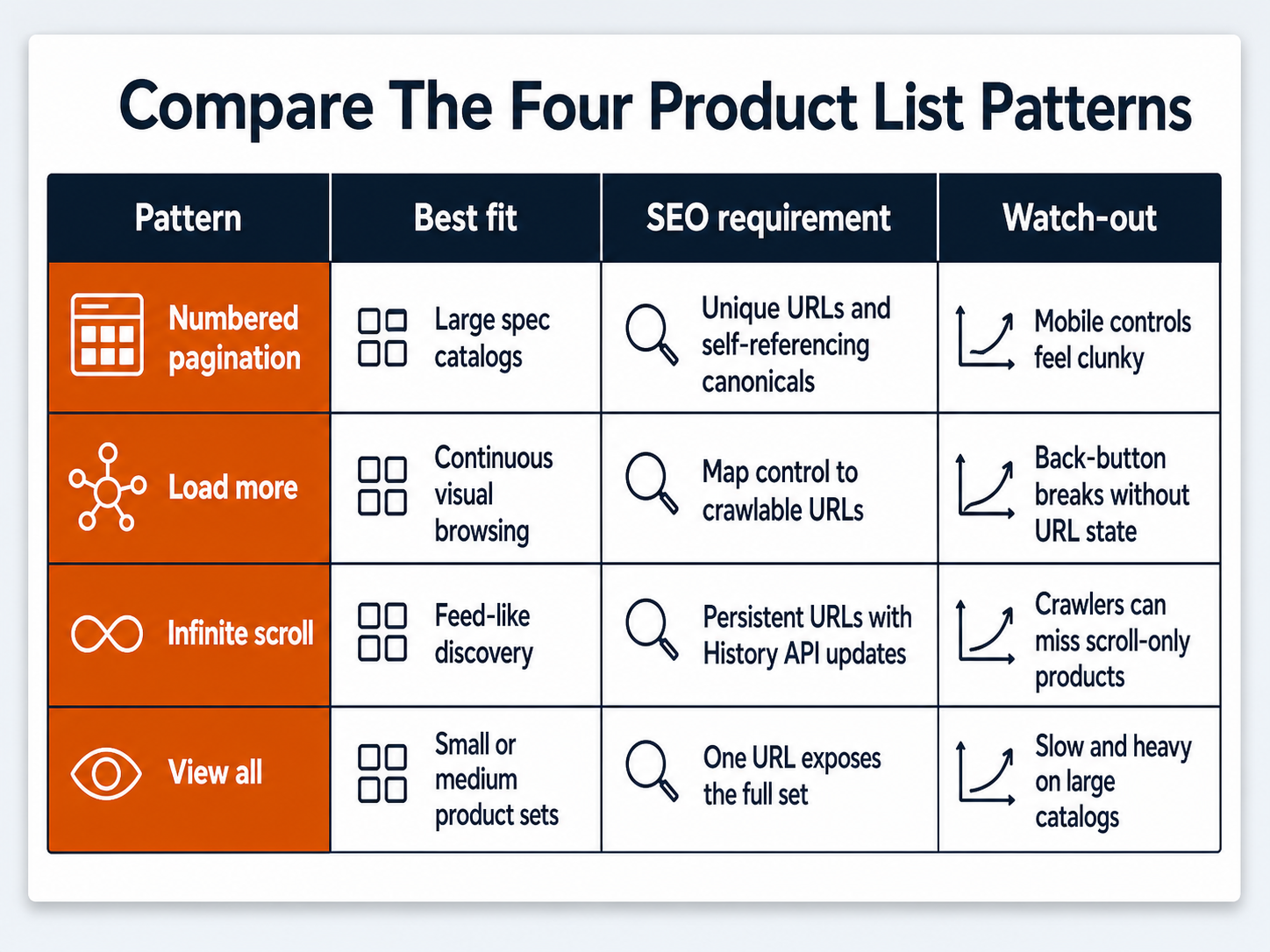
Shoppers do not care whether your category is “paginated” in the SEO sense. They care whether they can browse without waiting, compare products easily, and return to the same spot after clicking a product. Search engines care whether the product and category URLs are discoverable.
Those goals can work together, but each pattern has tradeoffs.
| Pattern | Best fit | SEO requirement | Watch-out |
|---|---|---|---|
| Numbered pagination | Large catalogs, spec-heavy categories, B2B or parts catalogs where users may jump between pages. | Unique URLs, crawlable page links, self-referencing canonicals on indexable pages. | Page controls can be clunky on mobile and may reduce product exploration. |
| Load more | Visual browsing categories where shoppers want a continuous list without endless scroll. | The control should expose or map to crawlable URLs instead of only a JavaScript click event. | Back-button behavior often fails unless URL state is handled carefully. |
| Infinite scroll | Feed-like browsing or visual categories where continuous discovery matters. | Use persistent component URLs, sequential fallback links, and History API updates when new chunks become primary. | Products can be hidden from crawlers if loading depends on user scrolling alone. Footer access can also suffer. |
| View all | Small or medium sets where the page can load quickly with every item visible. | One URL can expose the full set when performance and usability hold. | Large catalogs can become slow, overwhelming, and less useful for shoppers. |
Google’s lazy-loading guidance says infinite scroll should support paginated loading with persistent unique URLs and sequential links. When a new chunk becomes the main visible content, the URL should update with the History API so users can refresh, share, and return to that state.
That is the practical middle ground. You can give shoppers a modern load-more or infinite-scroll experience while still giving crawlers a stable paginated path. The user-facing control and the crawlable URL model do not have to be enemies.
This is also a JavaScript SEO issue. If product links, category copy, or pagination controls appear only after user-triggered JavaScript, test what Google can actually see in rendered HTML before assuming the implementation is safe.
Faceted Navigation And Filters Need Separate Rules
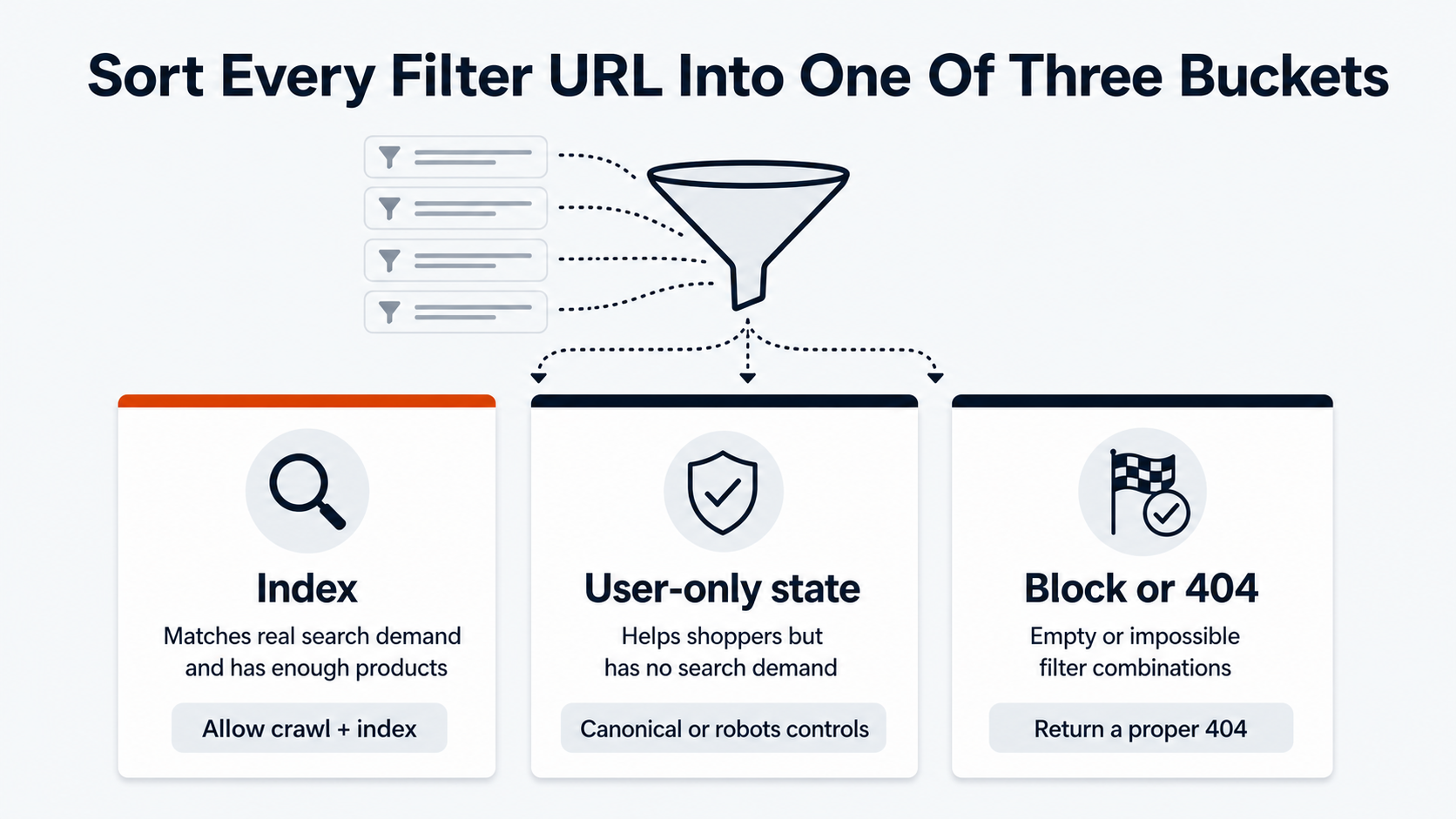
Pagination and faceted navigation are often tangled together, but they are different problems. Pagination splits one product set across multiple page states. Faceted navigation changes the product set by size, color, brand, price, material, rating, compatibility, availability, or sort order.
Filters can create useful landing pages. They can also create an almost endless crawl space.
Google’s faceted-navigation documentation warns that parameter-based filters can produce very large numbers of URLs and slow the discovery of useful pages. A shoe category with size, color, width, brand, price, and sort parameters can create thousands of combinations. Most of those combinations do not deserve to be indexed.
Good faceted navigation rules usually separate three groups:
- Valuable filtered pages that match real search demand and have enough products.
- User-only filter states that help shoppers but should not become indexable landing pages.
- Empty or impossible combinations that should not return a normal indexable 200 page.
For impossible combinations, Google’s faceted-navigation guidance recommends a proper 404 response. That applies when a URL asks for a product set that does not exist, such as duplicated filters or a nonsensical combination. Do not redirect every impossible combination to a generic category page and call it fixed.
The hard part is policy. SEO, merchandising, and development need a shared rule for which filters become crawlable pages, which use canonicals or robots controls, and which are blocked before they waste crawl resources. That is often a technical SEO services project because the fix lives in templates, links, canonicals, robots rules, and platform behavior.
How to Audit eCommerce Pagination SEO
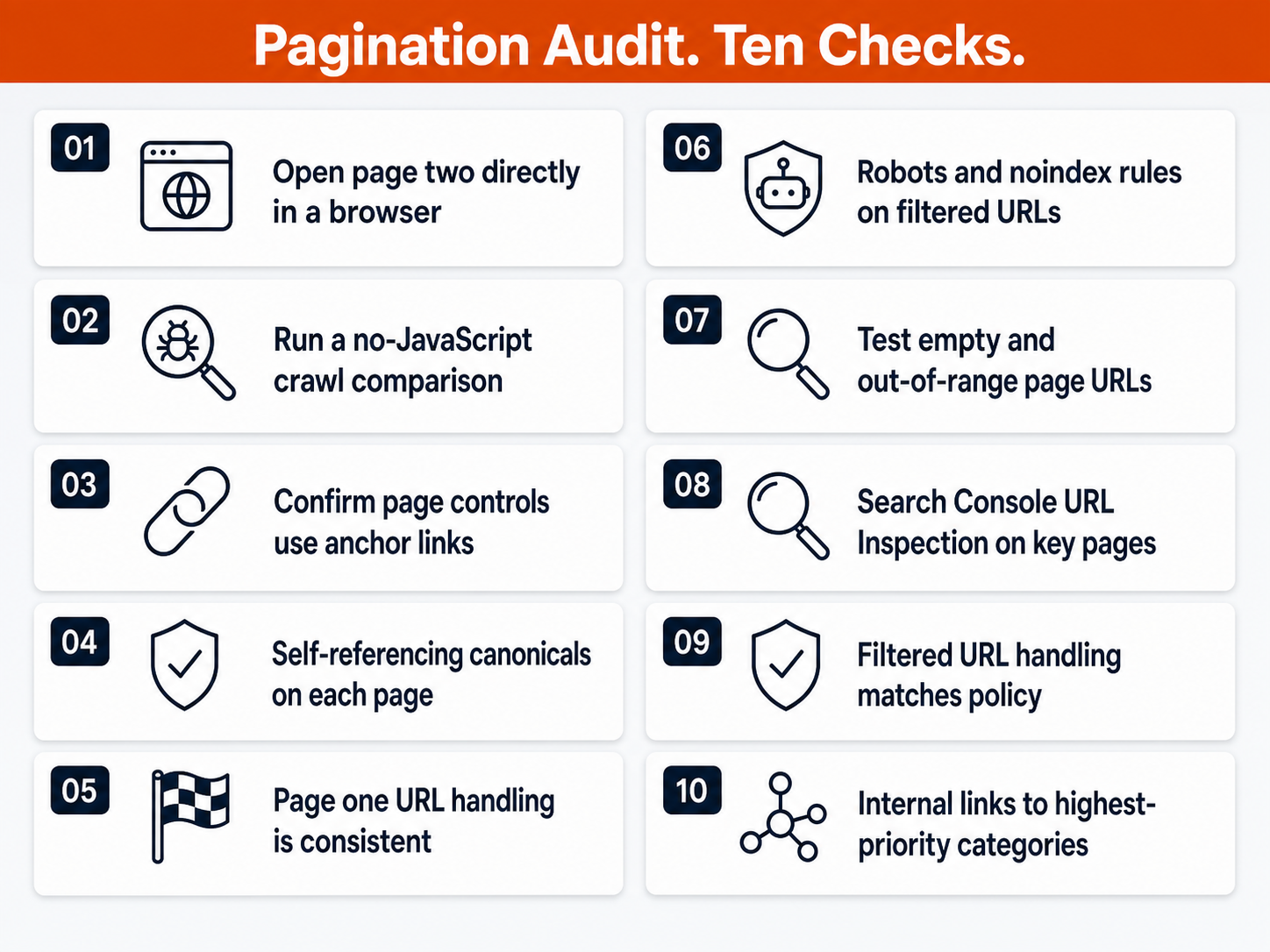
An eCommerce pagination SEO audit should test what actually renders rather than what the template is supposed to do.
Start with a normal crawl. Confirm that page two, page three, and deeper category URLs are discoverable through anchor links. Check whether product detail URLs from deeper pages appear in the crawl. If they do not, the product grid may be hidden behind a control crawlers cannot follow.
Then inspect the page source and rendered HTML. Google’s JavaScript SEO documentation explains that Googlebot first parses the HTML response, then may render JavaScript and parse rendered HTML. Products and links that only appear after a click or scroll deserve extra scrutiny.
Use this checklist:
- Open page two directly in a browser and confirm it shows the expected product set.
- Disable JavaScript or use a crawler’s rendered/non-rendered comparison to see whether core links remain reachable.
- Verify that next, previous, and page-number controls use
<a href>links. - Confirm each indexable paginated URL has a self-referencing canonical.
- Check that page one URL handling is consistent across links, sitemaps, and canonicals.
- Review robots and noindex rules for paginated, filtered, and sorted URLs.
- Test empty or out-of-range URLs, such as page 999 when only 10 pages exist.
- Use Search Console URL Inspection to confirm important content and product links appear in rendered HTML.
- Cross-check filtered URL handling against the faceted navigation policy above.
- Review internal links from category copy, buying guides, and related articles to the categories that matter most.
Pagination should also be reviewed with revenue in mind. A crawl report can tell you whether page seven exists. It cannot tell you whether the products on page seven are high-margin, seasonal, discontinued, or important to a paid media campaign. Strong eCommerce SEO connects crawlability to business priority.
That is where eCommerce SEO services should pull technical SEO, category strategy, merchandising, and analytics into the same conversation. The goal is not to make every URL crawlable. The goal is to make the right URLs discoverable, useful, and measurable.
Turn Pagination SEO Into a Cleaner Crawl Path
The best eCommerce SEO pagination setup is not the one with the trendiest UX pattern. It is the one shoppers can use, developers can maintain, and search engines can crawl without guessing.
Numbered pagination, load-more buttons, infinite scroll, and view-all pages can all work in the right context. The common requirement is discipline: stable URLs, crawlable links, correct canonicals, controlled filters, and testing in the rendered page Google can actually see.
OuterBox helps eCommerce teams connect those decisions to the larger SEO system: category architecture, technical crawl paths, internal links, merchandising priorities, and measurement. Pagination is only one template pattern, but on a large catalog, one template pattern can decide how much of the store Google can reach.
Frequently Asked Questions About eCommerce SEO Pagination
Should paginated pages canonicalize to page one?
Indexable paginated pages should generally not canonicalize to page one when they show different products. Google’s current guidance says each page in a paginated sequence should have its own canonical URL. Filtered, sorted, or duplicate parameter URLs may need different rules, but normal page-number pagination should not be collapsed blindly.
Does Google still use rel=next and rel=prev?
Google says rel=prev/next is not an indexing signal anymore. The tags may still exist on older templates, but they should not be treated as the main pagination fix. Crawlable links, stable URLs, correct canonicals, and rendered product links are more important for modern Google indexing.
Is infinite scroll bad for eCommerce SEO?
Infinite scroll is risky when products load only after user scrolling and have no persistent URL path. It can work when each content chunk has a stable URL, sequential links, and History API handling. The safest pattern gives shoppers continuous browsing while giving crawlers crawlable paginated URLs.
Is a load-more button good for SEO?
A load-more button can be good for users, especially on visual category pages, but it needs a crawlable URL model behind it. If the button is only a JavaScript event with no accessible URL, Google may miss products loaded after the initial page. Treat load-more as UX layered over crawlable pagination.
Should filtered category pages be indexed?
Some filtered category pages should be indexed when they match real demand, have enough products, and serve a distinct search intent. Most filter and sort combinations should not become indexable pages. Large catalogs need rules for valuable filters, user-only states, and impossible combinations.