By: Jeff Hirz
WordPress vs Shopify is really a question about how your business wants to run eCommerce. Shopify gives you a hosted store, checkout, payments, apps, and support in one managed platform. WordPress gives you a content management system that can become a store with WooCommerce, but you own more of the hosting, development, security, and maintenance decisions.
Shopify vs WordPress is not a winner-take-all comparison. The better platform depends on your products, content plan, SEO needs, checkout requirements, integrations, budget, and the team responsible for keeping the site healthy after launch.
The biggest difference between WordPress and Shopify is ownership: Shopify manages more of the store platform, while WordPress gives your team more control over the website stack.
WordPress vs Shopify: The Short Answer
For teams that want to launch an eCommerce store quickly, Shopify keeps hosting, checkout, security updates, and support inside one platform. For teams that need more control over content, SEO, custom functionality, data ownership, and long-term website architecture, WordPress with WooCommerce is usually the better fit.
That answer gets more useful when you look at the tradeoffs side by side.
Shopify vs WordPress Comparison Table
| Decision Point | Shopify | WordPress With WooCommerce |
|---|---|---|
| Core platform | Hosted eCommerce platform | Self-hosted CMS with eCommerce added |
| eCommerce model | Commerce is native to the platform | WooCommerce or another plugin adds product, cart, and checkout tools |
| Setup | Faster for standard online stores | More setup work, especially hosting, plugins, theme, and QA |
| Cost structure | Monthly plan, payment rates, apps, themes, and development | Free core software, plus hosting, domain, theme/design, plugins, development, security, and maintenance |
| Payment processing | Shopify Payments or third-party gateways, with plan-specific fees | WooPayments or third-party gateways, with fees charged by payment providers |
| SEO control | Strong for many stores, with some platform constraints | More flexible for technical SEO, content architecture, and custom templates |
| Best fit | Teams that want a managed commerce platform | Teams that want ownership, content depth, and custom control |
How WordPress Works
As open-source content management software, WordPress powers a large share of the web because it can support simple blogs, corporate websites, publishing sites, landing pages, and complex custom builds. W3Techs reported on May 27, 2026 that WordPress is used by 41.9% of all websites and 59.5% of websites where the CMS is known.
WordPress itself is not a hosted store. With self-hosted WordPress.org software, your team chooses the host, installs WordPress, selects a theme, adds plugins, manages updates, and decides how much custom code the site needs. WordPress.org recommends a modern hosting baseline with PHP 8.3 or greater, MariaDB 10.6+ or MySQL 8.0+, and HTTPS.
That ownership is the point. WordPress gives you broad control over content types, page templates, URL structure, SEO plugins, tracking, and custom functionality. But the same control creates responsibility. Someone has to maintain the stack.
How WordPress Becomes an eCommerce Platform
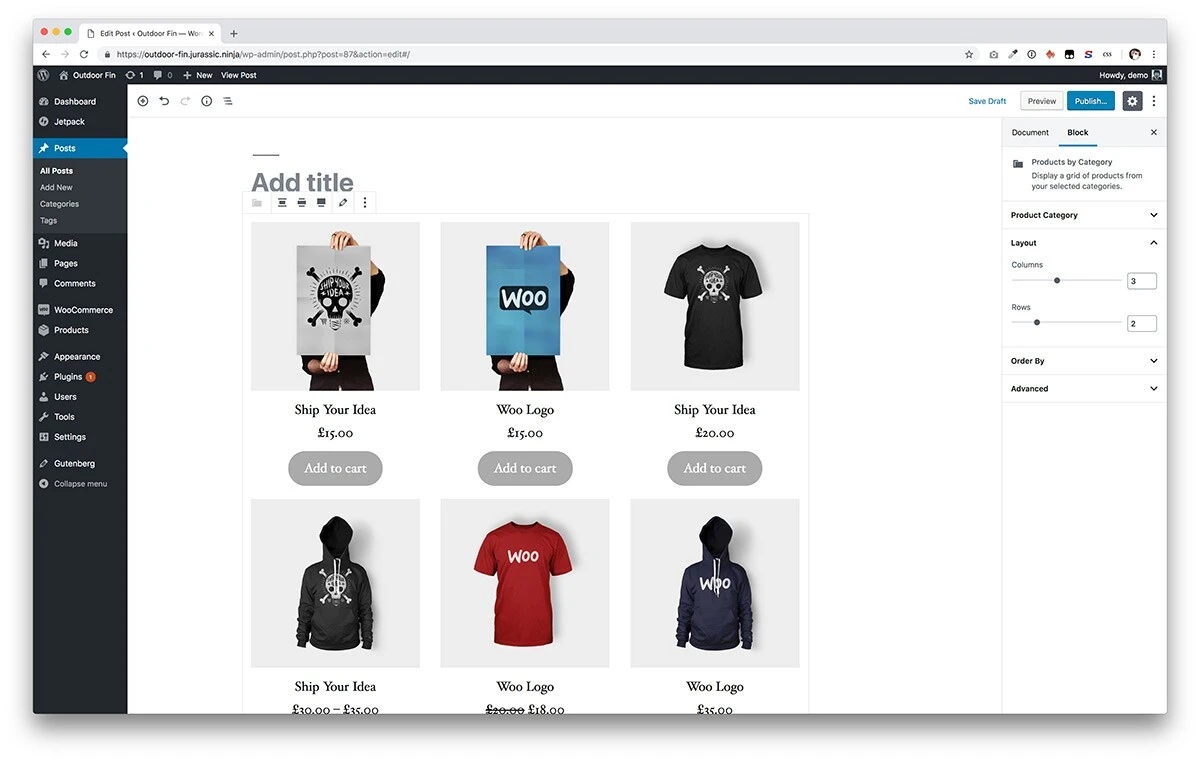
To turn WordPress into an eCommerce platform, most teams use WooCommerce or another commerce plugin. WooCommerce describes itself as a customizable, open-source eCommerce platform built on WordPress. It adds the store layer that WordPress core does not include by default.
WooCommerce can handle products, carts, checkout, shipping, taxes, coupons, payments, and order management. Extensions can add subscriptions, advanced shipping rules, product bundles, memberships, wholesale features, and integrations with systems like ERPs, CRMs, and email platforms.
The tradeoff is ownership. WooCommerce gives you more control over how the store works, but every extension and integration becomes part of the system your team has to manage. For the right business, that control is worth it. For a smaller team that wants fewer moving parts, it can be too much.
How Much Does WordPress Cost?
The core WordPress software is free and open source. WooCommerce core is free too. That does not mean a production WordPress eCommerce store is free.
This cost discussion is about self-hosted WordPress.org software paired with WooCommerce, not WordPress.com plan pricing.
A real WordPress/WooCommerce store can include hosting, a domain, SSL, a theme or custom design, development, paid extensions, payment processing, security, backups, accessibility checks, performance work, and ongoing maintenance. The total depends less on the WordPress license and more on what your store needs to do.
If you have in-house developers, WordPress can be cost-efficient because you can build around your own requirements. If you need an agency to plan, design, and develop the site, the build cost is a separate decision. For planning context, see our guide to WordPress website design pricing.
How Shopify Works
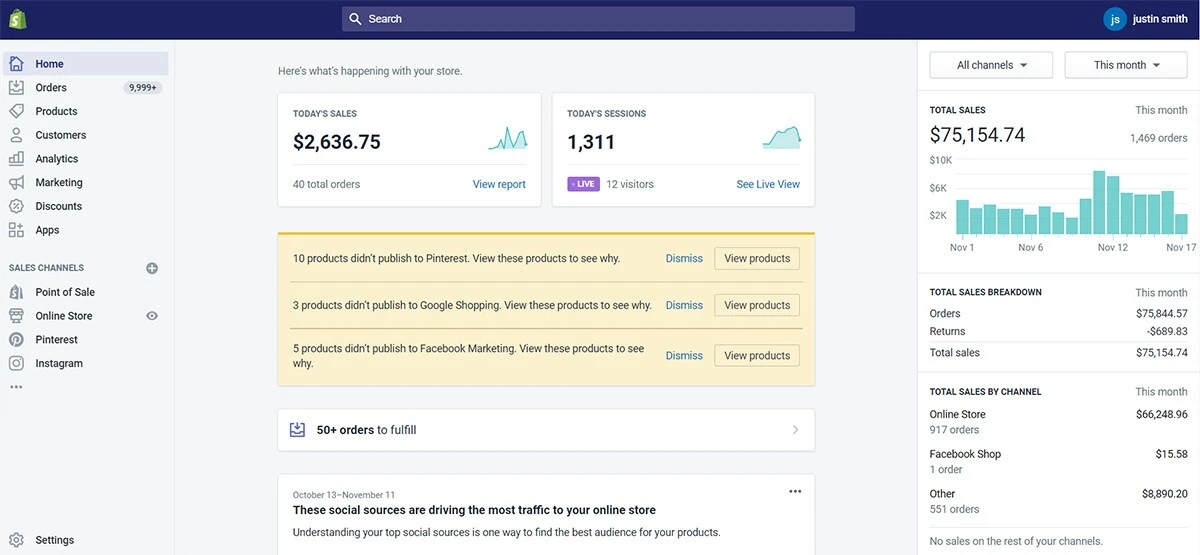
As hosted commerce software, Shopify lets you create a store, load products, configure the theme, set up payments and shipping, add apps where needed, and run commerce inside Shopify’s platform instead of installing software on your own server.
Shopify handles much of the operational foundation: hosting, checkout, platform updates, admin tools, security posture, product management, app marketplace access, payment options, and support. That makes Shopify attractive for teams that want to sell without managing a custom WordPress hosting stack.
Shopify is still customizable, but the customization lives inside Shopify’s rules. Theme edits, apps, Liquid development, checkout changes, B2B features, international settings, and advanced reporting can depend on plan level, app choices, or developer support.
How Much Does Shopify Cost?
Because pricing changes over time, always check Shopify’s pricing page before making a buying decision. As captured on May 27, 2026, Shopify listed annual-plan pricing at $29 per month for Basic, $79 per month for Grow, $299 per month for Advanced, and Plus from $2,300 per month.
Shopify also lists plan-specific card rates. At the time of capture, online card rates started at 2.9% + $0.30 on Basic, 2.7% + $0.30 on Grow, 2.5% + $0.30 on Advanced, and 2.25% + $0.30 on Plus. Monthly billing, international payments, premium cards, PayPal, POS, apps, themes, and development can change the actual monthly cost.
Shopify is often more predictable than WordPress at the platform-fee layer because the plans are published. The hidden cost is usually app stacking, theme customization, and process fit. A store with a few products and standard requirements can stay lean. A store with complex catalogs, B2B pricing, custom checkout needs, or deep integrations may need a larger budget. For planning, see our guide to Shopify website design pricing.

WordPress vs Shopify Setup: Speed vs Control
For setup speed, Shopify is usually easier. You do not need to choose a separate host, install WordPress, configure WooCommerce, manage plugin conflicts, or make early server decisions. For a straightforward catalog, Shopify lets you get into products, collections, payments, shipping, and theme setup quickly.
WordPress with WooCommerce takes more setup work. Your team has to choose hosting, install WordPress, configure WooCommerce, select and test plugins, build templates, set security rules, and confirm performance. Once the foundation is built well, WooCommerce can be just as serious as any other eCommerce platform. It just asks for more ownership at the beginning.
The real question is not which setup is shorter. The question is which setup matches the way your team will operate six months later.
Shopify vs WordPress Payment Processing and Fees
Payment processing is one of the most practical differences between Shopify and WordPress because it affects margin and operations.
Shopify has its own payment system, Shopify Payments, and it also supports third-party providers. Shopify states that when you use Shopify Payments, you are not charged third-party transaction fees for orders processed through included payment methods. If you use a third-party gateway instead, Shopify’s plan-level third-party transaction fees can apply on top of what the payment provider charges.
WooCommerce works differently. WordPress core does not charge a platform transaction fee for orders. WooCommerce stores use WooPayments or another gateway, and the payment provider charges the processing fees. WooPayments publishes country-specific pricing. For U.S. merchants, WooPayments lists card payments at 2.90% + $0.30, with additional international, currency conversion, and dispute fees possible.
For a small store, the difference may not change the decision. For a high-volume store, payment method, card mix, international sales, subscriptions, chargebacks, and third-party gateway needs can make platform economics matter.
WordPress vs Shopify Customer Support
Support is cleaner on Shopify because Shopify owns the hosted platform. You can go to Shopify for many platform issues, billing questions, plan questions, and store-admin problems. That centralized support is valuable when your team does not want to diagnose the difference between a host issue, plugin issue, theme issue, and checkout issue.
WordPress support is more distributed. You might work with your host, a plugin developer, WooCommerce documentation, a theme vendor, a developer, or an agency depending on the problem. That can feel less convenient. It can also be more flexible, because you are not limited to one platform’s answer.
If you want one platform owner, Shopify has the advantage. If you want a stack you can shape around your business, WordPress can make more sense, but you need the right support team around it.
Is WordPress or Shopify Better for SEO?
Both WordPress and Shopify can support strong SEO. OuterBox has seen both platforms perform when the site is built cleanly, maintained well, and supported by the right content and technical SEO work.
WordPress with WooCommerce usually gives more SEO control. You can shape templates, schema, content types, blog architecture, internal linking, URL handling, metadata, redirects, performance work, and custom landing pages with fewer platform constraints. For content-heavy eCommerce brands, that control can matter.
Shopify is strong enough for many eCommerce SEO programs, especially when the store structure is clean, themes are not bloated, apps are managed carefully, and product/category content is built with search intent in mind. Shopify can have constraints around URL patterns, checkout, app scripts, and certain template-level choices, but those constraints are not automatic SEO blockers.
The better SEO platform depends on the site. A poorly maintained WordPress store can lose to a well-built Shopify store. A well-built WooCommerce store can outgrow Shopify constraints when the business needs deeper content, custom templates, or unusual technical control. For more context, read our eCommerce SEO guide or review our eCommerce SEO services.
WordPress vs Shopify Conversion Rate Optimization
Conversion rate optimization is where platform control starts to show up after launch. Shopify supports testing and merchandising changes, but your options may depend on the theme, checkout rules, plan, apps, and development access.
WordPress with WooCommerce can support deeper testing when the site is built for it. You can create custom landing pages, adjust content-heavy templates, test product education, build campaign-specific pages, connect CRO tools, and change page structure without waiting on a single platform’s preferred workflow.
That flexibility only helps if the team uses it well. More control can also mean more places to break things. CRO needs clean tracking, good QA, careful rollout, and a team that understands both the customer journey and the platform.
Can You Use Shopify and WordPress Together?
A hybrid Shopify and WordPress setup can work, but the architecture should be intentional. Some businesses use WordPress for content and Shopify for commerce through embedded products, Buy Buttons, subdomains, or more custom integrations. Others keep the whole store on Shopify and use Shopify’s blog because the operational simplicity is worth the tradeoff.
A hybrid setup can make sense if your content strategy is a major growth engine and your commerce needs fit Shopify well. It can also create extra work. Analytics, SEO ownership, cross-domain tracking, duplicate content, product data, design consistency, and maintenance all need planning.
If your team is already asking how Shopify and WordPress should work together, that is usually a sign to map the architecture before choosing the platform.
Which Platform Should You Choose?
For most ecommerce teams, the decision comes down to launch speed, pricing predictability, SEO control, and how much technical ownership the business wants long term.
Choose Shopify if:
- You want a faster path to launch.
- You prefer a hosted commerce platform.
- Your product catalog is relatively straightforward.
- Your team does not want to manage hosting, plugin conflicts, and platform updates.
- You value centralized platform support.
Choose WordPress with WooCommerce if:
- Your content strategy is central to growth.
- You need deeper SEO, template, or integration control.
- You already have a strong WordPress site and want to add commerce.
- Your team has development support or an agency partner.
- You want more ownership over the platform stack.
Talk with an agency if the decision is not obvious. Platform choice gets more expensive to undo after design, development, product migration, SEO mapping, tracking, and team workflows are already in motion.
Frequently Asked Questions About WordPress vs Shopify
Is Shopify WordPress?
No. Shopify is not WordPress, and Shopify is not built on WordPress. Shopify is a hosted eCommerce platform. WordPress is open-source CMS software that can support eCommerce when paired with WooCommerce or another commerce plugin.
What Is the Biggest Difference Between WordPress and Shopify?
The biggest difference is ownership. Shopify bundles hosting, commerce tools, checkout, updates, and platform support. WordPress gives you more control over the website stack, but you are responsible for hosting, eCommerce plugins, security, maintenance, and development decisions.
Is WordPress or Shopify Better for SEO?
For SEO control, WordPress usually offers more room for custom content, templates, schema, internal linking, and technical changes. Shopify can still rank well when the theme, app stack, site architecture, and content are built carefully. The better SEO choice depends on the implementation.
Is Shopify or WordPress Cheaper?
Cost is easier to estimate with Shopify because it has published plan pricing, but apps, payment rates, themes, POS, and development can add cost. WordPress and WooCommerce core are free, but hosting, paid extensions, security, maintenance, and development are real costs.
Can I Switch Platforms Later?
Yes, but platform migration needs planning. Products, URLs, redirects, metadata, order history, customer data, analytics, design, apps, and integrations all need review. A clean migration protects SEO, conversion tracking, and customer experience.
Build the eCommerce Store That Fits Your Business
The right eCommerce platform should fit the way your business sells, markets, measures, and maintains the site. Shopify can be the right answer. WordPress with WooCommerce can be the right answer. The wrong answer is choosing based on a monthly plan price without looking at content, SEO, checkout, integrations, and ownership.
OuterBox builds eCommerce websites around the business behind the catalog. If you are weighing Shopify, WordPress, WooCommerce, or a more custom direction, our eCommerce web design team can help you sort the tradeoffs and build the right path. When you are ready, request a free quote and we will walk through what your store actually needs.